Deeplink to AI coding tools
Starting an issue used to mean manually creating a feature branch. Now it means assembling the right context so your coding agent can take a first pass. We’ve made this much easier to do in Linear.
You can now launch your preferred coding tool directly from a Linear issue, with a prefilled prompt that includes the issue ID and all relevant context: description, comments, updates, linked references, and images. No copying or reformatting required.
Open in a coding tool by pressing Cmd Option . (Mac) or Ctrl Alt .(Windows/Linux) to launch your most recently used tool, W then O to choose from your enabled tools, or by clicking the button next to the issue identifier.
Supported tools:
- Claude Code
- Codex
- Conductor
- Cursor
- GitHub Copilot
- OpenCode
- Replit
- v0
- Zed
Prompt templates can also be customized to add standing instructions for how your agent should approach issues. For example, you may always want your agent to give you a detailed plan before writing any code.
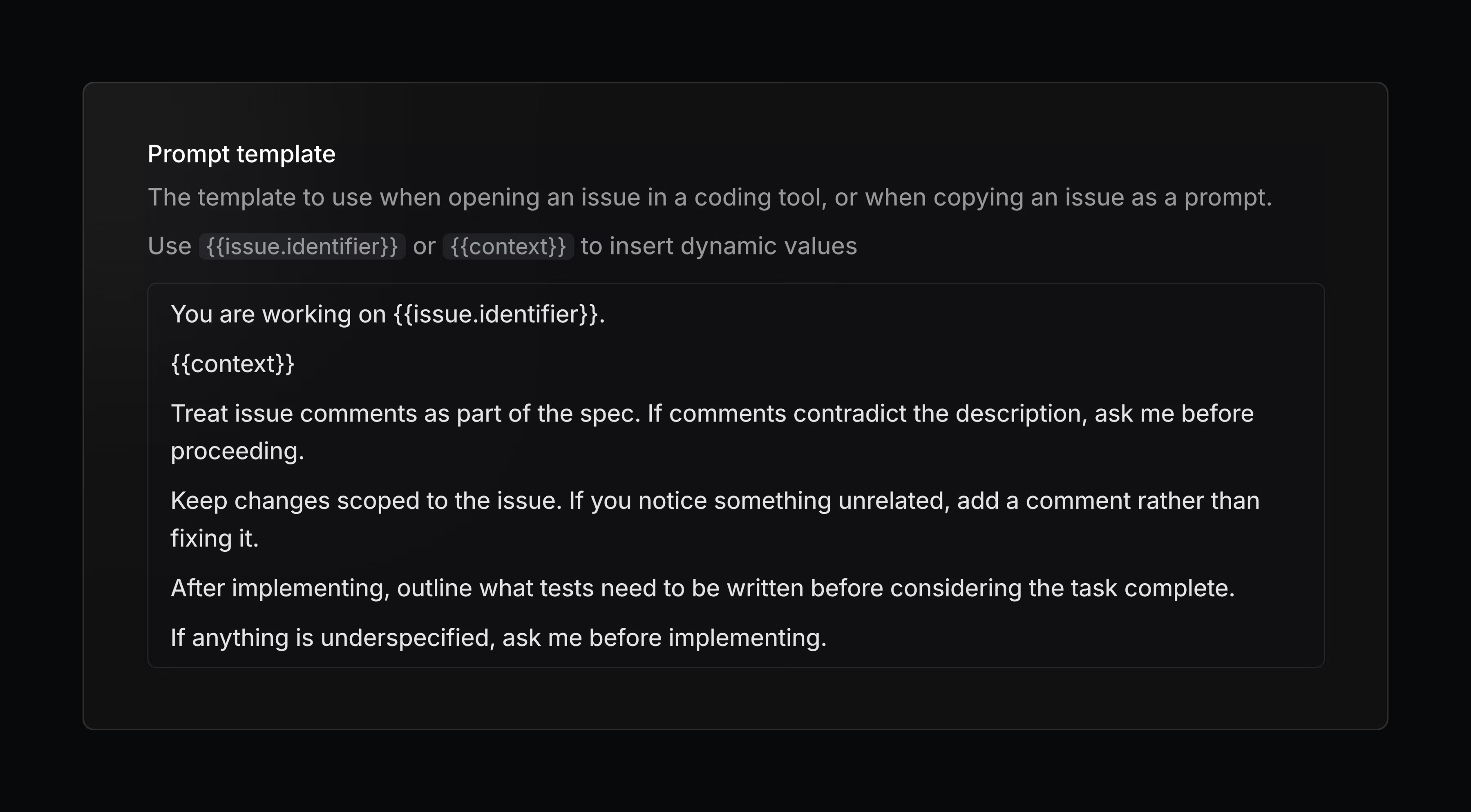
Configure your personal coding tools, prompt template, and more in preferences.
Linear in Notion’s Custom Agents
Create and update Linear issues and projects using Notion’s new Custom Agents. Flexibly and seamlessly connect your workflows across both tools.
- MarkdownPreviously uploaded file links now render correctly in the editor when used in mutations
- WebhooksProject webhooks now trigger on milestone and relation changes
- Agent sessionsFixed agent sessions remaining associated when an issue is archived, allowing them to be restored along with the issue
- DocumentsFixed a bug where switching tabs while commenting on a document would lose the draft of the comment
- EditorFixed an issue preventing editing an empty Mermaid diagram in fullscreen mode
- InsightsFixed an issue where Insights in fullscreen would not reopen after pressing Back when opening an issue
- iOSCorrected SLA history duration rendering in issue activity when SLA start times are reset, including proper “ago” formatting for pre-start breach timestamps
- ListsFixed an issue with selecting a parent when a child issue is already selected
- LocaleFixed a crash that could occur when using an unknown system locale
- Project LabelsFixed an issue adding new labels to existing project label groups in some scenarios
- Project MilestonesFixed drag-and-drop glitches on the project overview page
- Project UpdatesFixed an issue where updates could post to Slack twice
- PulseFixed daily Pulse project/update links incorrectly pointing to
example.com - SettingsFixed editing statuses occasionally getting stuck in a pending state
- ViewsFixed inline search on view lists not reliably returning results.
- ImagesRemoved meaningless image captions (such as hashes or UUIDs) from display
- Issue TemplatesDefault template statuses are now respected in more situations
- WebhooksAdded a
diffMarkdownfield to project and initiative update webhook payloads, providing a formatted summary of changes between updates - EmojisImproved emoji search performance for organizations with many custom emojis
- Agent sessionsThought items in the session sheet now render as full rich text instead of a single truncated line
- IssuesAdded SLA status to issue responses
- IssuesImproved support for parent labels
- IssuesAdded support for filtering issues without an assignee
- IssuesCombined
create_issueandupdate_issuetools into a singlesave_issuetool. - ProjectsAdded support for looking up projects by slug
- The / key now correctly types as a character in action menu text fields when text is present, instead of always triggering search