Multi-level sub-teams
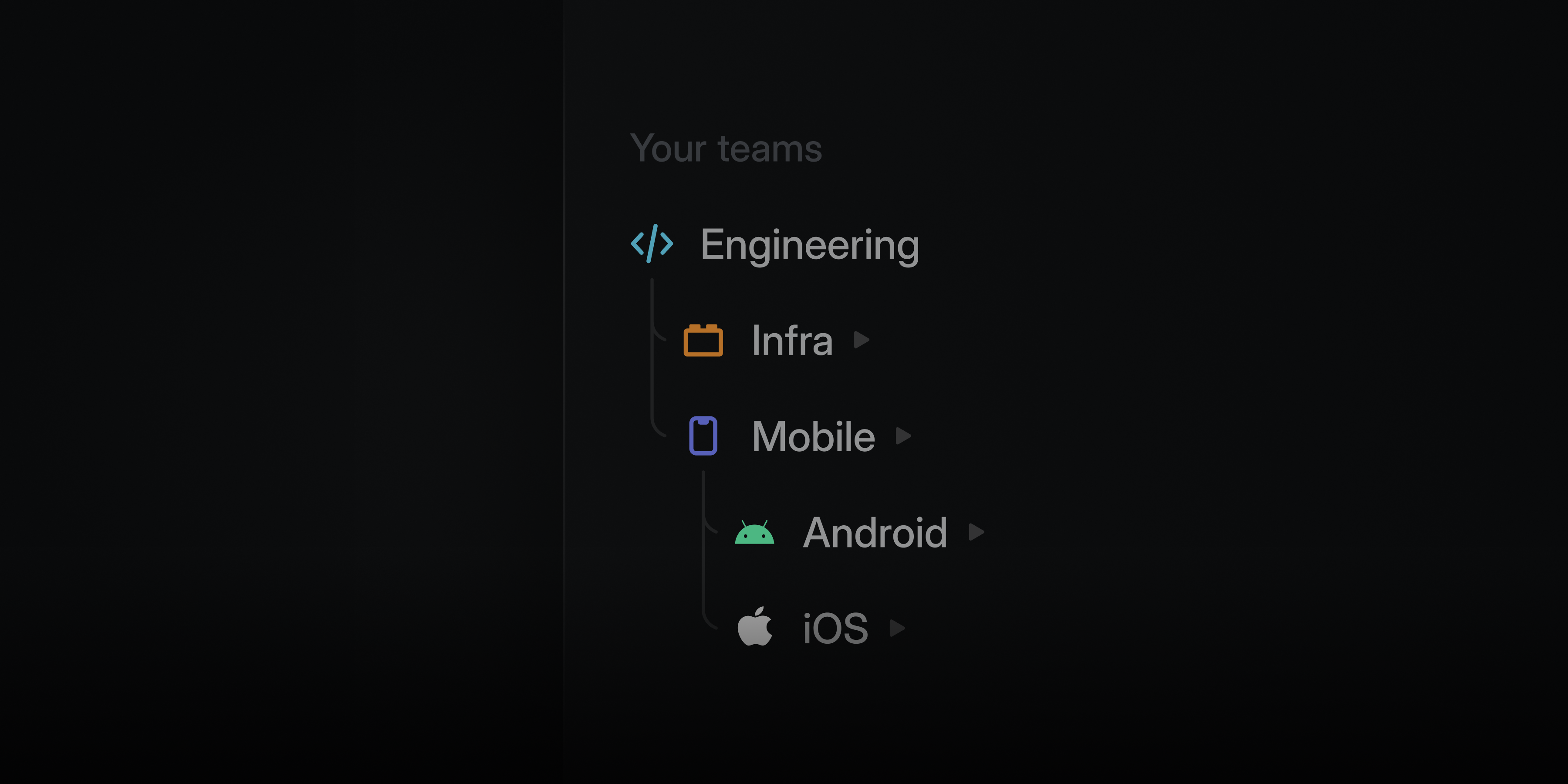
Structure your teams in Linear to match how your organization works.
Teams can nest up to five levels deep, making it possible to represent divisions, departments, groups, squads, and more. Sub-teams inherit workflows and settings from their parents at every level, so you can maintain consistency while giving each unit flexibility in how they work.
Multi-level sub-teams are available on the Enterprise plan. Learn more in our docs.
Project and initiative comments
Projects and initiatives now support comments in their activity feed, giving teams a place for high-level discussion alongside updates. Conversations stay attached to the work itself, making it easier for both people and agents to follow and reference.
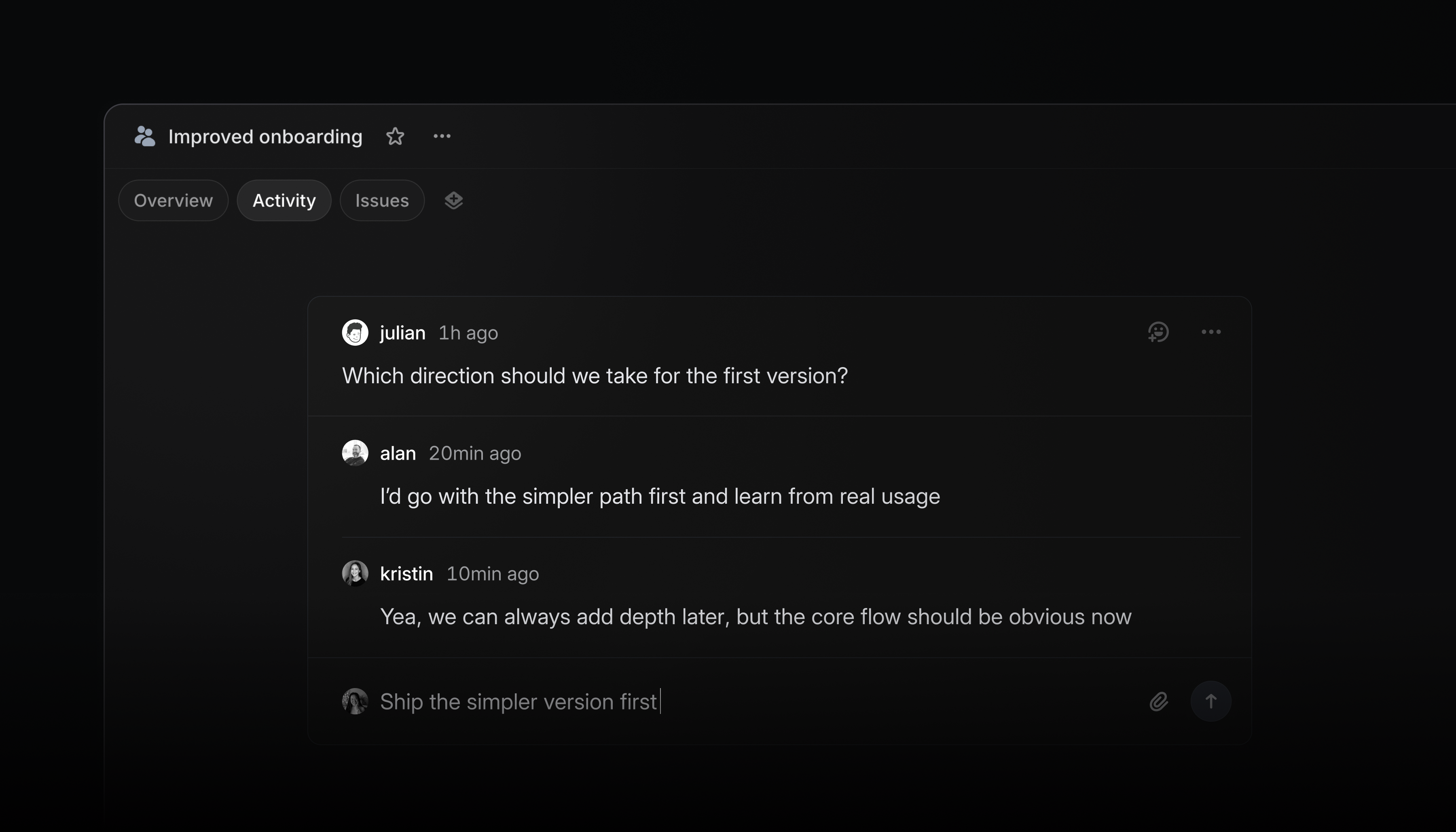
Use comments to:
- provide lightweight feedback that doesn’t belong in an inline comment or formal update
- discuss open questions and resolve threads once decisions are made
- capture meeting takeaways and mention @Linear to update docs, revise descriptions, and create issues
- AgentYou can now search past agent chats from the Cmd/CtrlK menu
- APIFixed initiative filtering by team
- APIFixed workflow state positions being unexpectedly reordered when resolving position collisions
- AsksFixed Slack Block Kit messages losing rich content during automatic Ask creation
- Code BlockFixed syntax highlighting not appearing when a code block language was set via Markdown paste or the VS Code clipboard
- CommentsFixed comment permalinks not scrolling to the target comment after the first click
- Customer requestsFixed customer request notifications being sent to users who don’t have access to the private team containing the issue or project
- EditorFixed a performance issue when editing collaborative documents in Firefox
- EditorFixed mentions not being inserted when clicking the mention menu in Safari
- EditorFixed video and audio players no longer stealing focus when a user is typing or has a text field in focus
- EditorFixed pasted GitHub comments rendering as tables instead of plain text
- FiltersFixed duplicate filter conditions being added
- GitHubFixed GitHub Enterprise Cloud integration settings not showing all installed organizations
- GitHubFixed the integration settings page linking to github.com instead of the configured enterprise instance
- Issue ViewsFixed deleting a view from the view details page navigating home instead of back to the views list
- ProjectsFixed deleting an issue from a project board navigating to My Issues instead of back to the project
- SearchFixed search input dropping initial keystrokes when typing immediately after pressing “/”
- SlackFixed Slack table attachments not appearing in synced issue comments
- TriageFixed the Copy submenu on triage suggestions copying the parent issue’s data instead of the suggested issue’s data
- AgentAgent no longer asks for confirmation on routine bulk updates of up to 5 issues
- API keysImproved scope information shown for each API key
- AsksAdded a browser prompt before leaving an unsubmitted Ask with unsaved changes
- EditorImproved @mention hover cards so you can move your cursor into them
- FocusImproved grouping so pull requests that close an issue appear under that issue’s project when grouped by project
- GitHubAdded support for magic words in revert pull request descriptions
- OAuthAdded a last used date to application OAuth tokens when available
- ProjectsProject activity now shows when Slack channel creation fails, including the reason
- IssuesIssues created through the MCP without a
stateIdnow default to the team’s default state, even when triage is enabled, if the user is a member of the team
Web forms for Linear Asks
Linear Asks allows you to capture internal requests and bring them into Linear so the appropriate team can work on them. Previously, we’ve enabled intake through Slack and email.
Now we’ve added custom web forms as well.
Teams can create a dedicated Asks page with forms for the types of requests they handle, like feature requests, bug reports, data pulls, or HR and IT tasks. Forms are powered by issue templates, so teams control exactly what information gets collected. Every submission becomes an issue in the team’s triage inbox, where it can be fielded by a team member or routed with Triage Intelligence.
Anyone in your company can create an ask, even if they don’t have a Linear account. After submitting an ask, submitters can follow up through a synced email thread on the issue.
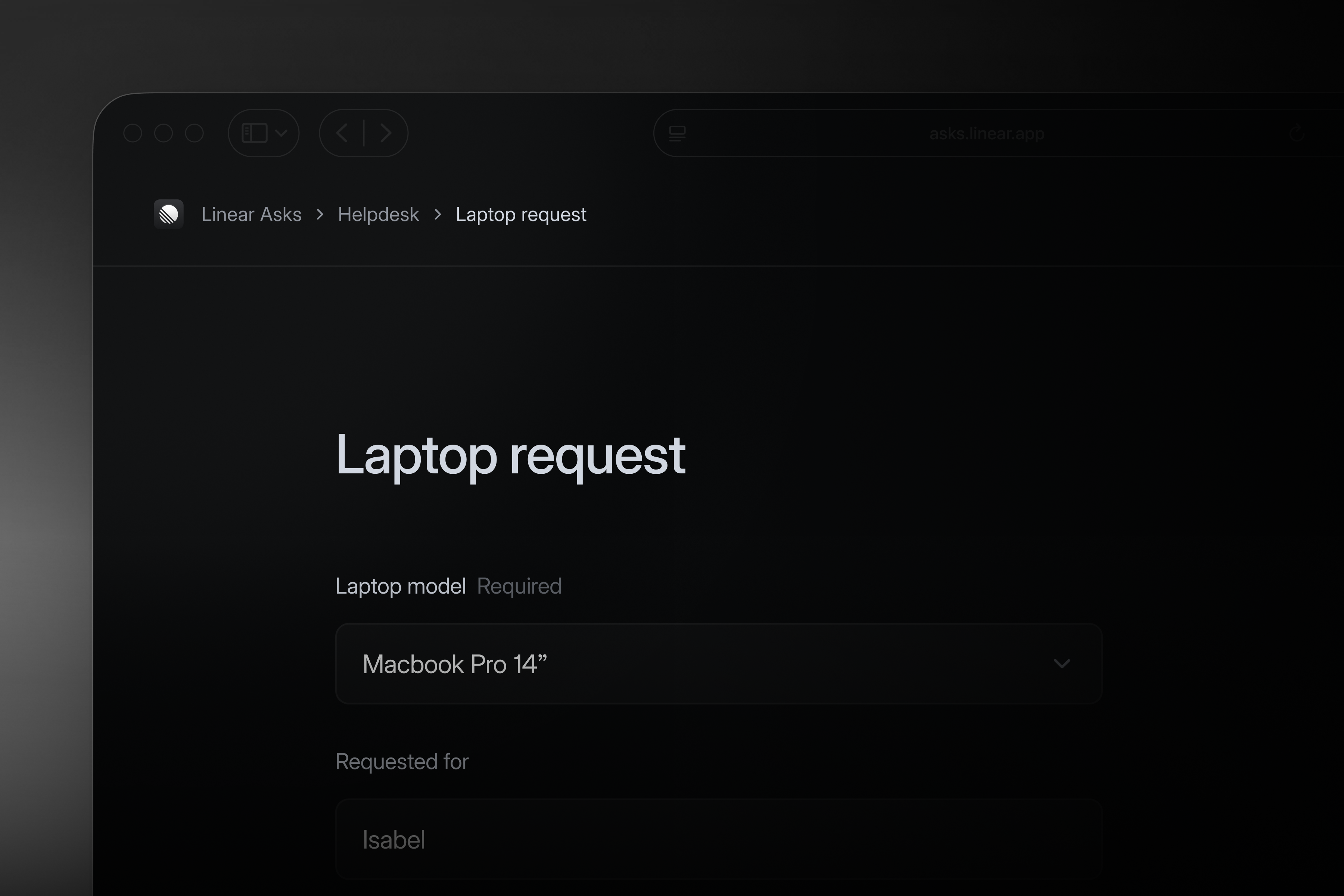
Web forms for Linear Asks are available on the Enterprise plan. Learn more in our documentation.
- AgentFixed “Ask Linear” and history buttons highlighting when the agent toolbar is right-clicked
- AgentFixed agent chat prompt clearing when navigating to settings pages
- AgentFixed slow UI responses when agent chat is streaming
- Agent automationsFixed a bug where the agent triage automation editor could lose the input if the rule failed to save
- Agent SessionFixed long file paths overflowing in agent activity tooltips
- AsksPreserved original Slack rich text formatting from Slack Asks forms
- Code ReviewsFixed Swift raw/extended string literals (
#"..."#) breaking syntax highlighting for the remainder of the file - Date fieldsFixed date picker not respecting the user’s locale when entering a date without a year (e.g. 05/06 would always resolve to May 6th)
- DocumentsFixed duplicate favorite action showing when viewing a project document
- EditorFixed the toggle checklist keyboard shortcut (Alt/Option Enter) which had been incorrectly changed to Cmd/Ctrl Enter
- EditorStopped collapsed code blocks from automatically expanding after refocusing an issue page
- EditorFixed entity mention icons not updating in real-time when changed by another user
- EditorFixed text formatting dropdown appearing detached and at the wrong z-index when editing sub-issue descriptions
- EditorFixed pasting screenshots into editors not auto-scrolling to reveal the pasted content
- FavoritesFixed favoriting an Initiative’s Update tab incorrectly taking you to the Projects tab
- FocusFixed breadcrumb in the Focus tab showing misleading parent/sub-issue hierarchy when navigating between issues
- GitLabFixed an issue where merging a GitLab MR could move the linked issue backwards in status automations instead of staying in “Done”
- InboxFixed notification type filters in inbox
- InboxAnchor links in document comments now correctly navigate to the linked section when opening from Inbox
- InboxFixed inbox project filter sometimes not showing any projects
- InboxChanged empty state to fill the whole width of the inbox view
- InitiativesFixed initiative filtering showing unrelated parent initiatives when sub-initiatives have multiple parents
- IntegrationsFixed flickering when navigating to an already installed external integration page
- Issue ActivityFixed issue activity section rendering empty initially and history entries popping in with layout shifts when navigating between issues
- IssuesFixed missing left padding on delegation pill in issue list views
- IssuesFixed business-day issue SLAs so weekend-created issues expired at the next working-day boundary
- IssuesHovering over actor names of issue history entries now shows a popover
- ListFixed missing padding on the selected items count badge shown in collapsed group headers
- OAuthFixed authorize button being disabled when auto-submit form is unavailable
- OAuthFixed the Authorize button being disabled for users in workspaces where another user had already authorized the OAuth app with
prompt=consent - ProjectsFixed the “Away” badge not showing in multiple users’ popovers (e.g. project members)
- ProjectsFixed project health grouping to correctly place projects with “never” update schedule and non-active projects with stale health in the “No update expected” group
- ProjectsProject update reminders are no longer sent for deleted projects
- Project UpdatesCreating an issue from a project update now properly adds that issue to the project
- Project UpdatesFixed project update mentions showing project preview instead of update preview
- SettingsFixed team settings workflows and automations page layout shift on initial load
- ShortcutsAdded O + V command to the shortcuts list in the ? menu. This shortcut was previously functional but not listed.
- SidebarFixed collapsed teams in the sidebar auto-expanding when navigating to a team page via command menu or keyboard shortcuts
- AgentLinear Agent can now reorganize issue and project labels
- AgentDragging files anywhere onto the agent chat window now triggers file upload
- AgentChats can now be copied as markdown
- AgentAdded ability for Linear Agent to delete customers
- AgentMy Issues, Inbox, Reviews, Pulse, and team views can now be included as context for Linear Agent
- AgentImproved the expand/minimize arrow icons in the agent chat window for clearer iconography
- AgentImproved recognition of natural-language delegation prompts in Slack (e.g. “@Linear work on this”, “@Linear go”)
- AsksUpdated “Reconnect” copy in Slack and Asks settings to say “Update connection”, as integration is still connected when this displays
- Custom ViewsAdded “Show sub-team issues” toggle to custom view display settings when the view is associated with at least one team with sub-teams
- Deeplinks to AI coding toolsRun a custom local script when opening issues in coding tools. Enable this behavior in preferences.
- Deeplinks to AI coding tools“Copy as prompt” now respects the “move issue to started status” preference, matching the existing open-in-coding-tool behavior
- DesktopDesktop redirect interstitial now shows a countdown before closing
- DraftsDrafts page cards now have a subtle shadow for better visual separation
- EditorCode block controls are now hidden when text is being selected
- EditorImproved and unified mention styling
- GitHub“Implements” is now a magic word for GitHub PR descriptions, matching the behavior of “closes,” “fixes,” and “resolves”
- GuestsGuest users now see a “Guest” badge on their hover card, making their role clearly visible
- InboxYou can now make Inbox sidebar smaller, the minimum width is now 300px instead of 350px
- InboxAdded “Mark all as read” to the inbox sidebar right-click menu
- Jira SyncNew Jira sync unidirectional links to sync property changes back to Jira
- Jira SyncAdded the ability to manually link a Jira epic to a project, enabling sync for projects that weren’t automatically linked
- SettingsUpdated agent automations description to clarify triage-only scope
- SlackArrow sequences (
->,-->,<-,<--) in Slack notifications are now rendered as→/← - TeamsImproved retired banner copy to “Team retired — [model] is read-only” for clarity
- TriageAdded “Show triage issues” toggle to issue list display settings on team, project, and My Issues screens
- VideosAdded “Copy link at timestamp” to the video context menu. Pasting the copied link embeds the video starting at the referenced timestamp
- Fixed MCP OAuth flow hanging on the redirect page for non-Safari browsers
- Fixed MCP OAuth flow failing when the callback probe consumed the authorization code before browser navigation
- Added support for removing issue relationships
- Updated ChatGPT app client ID for search and fetch tools
- Added
trashedfield tolist_projectsandget_projectresponses so consumers can identify soft-deleted projects
- Added
parentIdfilter to issue subscriptions
Introducing Linear Agent
We’re excited to share the next major step in Linear’s evolution. For the vision behind Linear Agent, read the letter from our CEO, Karri.
As execution accelerates, the bottleneck in product development shifts toward judgment: deciding exactly what to build and where your team’s time, attention, and tokens are best spent.
Your workspace already contains much of the context needed to drive good product decisions, but getting to it means reading through threads, combing the backlog, reviewing customer requests, and piecing together what’s relevant.
Linear Agent brings all of that context within reach.
Built directly into Linear, and accessible everywhere, Linear Agent understands your roadmap, issues, and code. It can help you synthesize context, make recommendations, and take action.
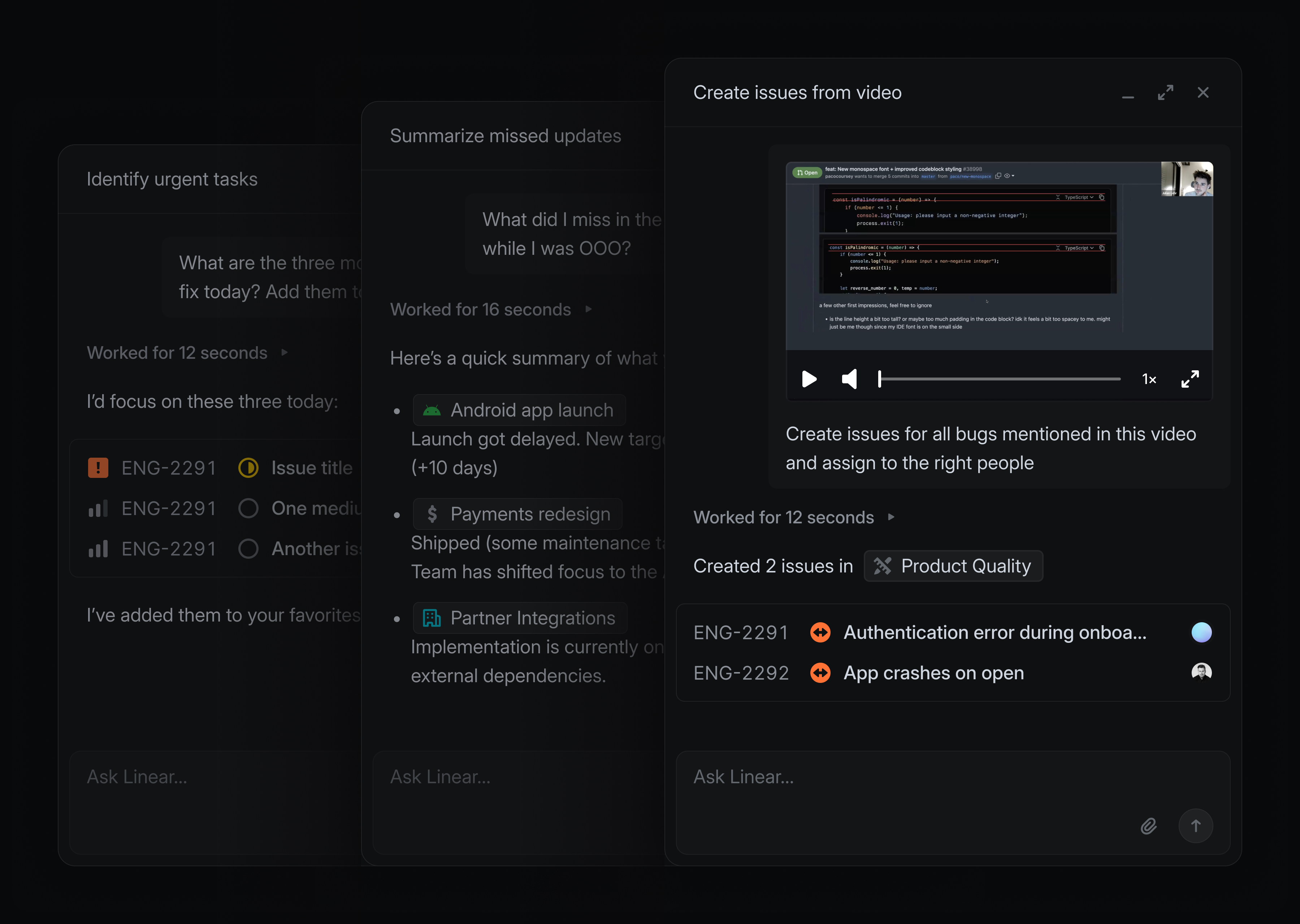
For example, when starting a new project, instead of manually researching past feature requests, you can ask Linear to find related issues, group them by relevance, and pull the right ones in. From there, ask it to extract common requirements across customer requests and scope out a starting point for your spec — all in a few minutes.
Linear Agent is powered by frontier language models and fully grounded in the context of your workspace. Use it to supercharge your everyday workflows:
- In Slack, send: “@Linear Make issues based on the discussion here and assign them to me”
- When writing a project update, tell it: “I’m writing an update for this project. What’s changed recently, and what should I include?”
- When planning your next cycle: “Read this backlog and pull out repeated themes that we can prioritize”
- When you come back from time off and need to know what’s going on: “Is anything at risk or falling behind that I should be aware of?”
Linear Agent works with you wherever you are. Open a chat from the bottom-right of the desktop app (shortcut Cmd/Ctrl + J) or the mobile app, or mention @Linear in any comment or reply. It’s also available in Slack and Microsoft Teams.
Skills and Automations
As you use Linear Agent, you’ll find workflows worth repeating. When a conversation gets you to a good result, you can ask Linear to save it as a reusable skill. This is especially useful for recurring workflows, like catching up on projects or drafting issues from meeting notes. Run a skill from the skills menu in any chat or with a slash command. Linear will also automatically use skills when it thinks they are applicable.
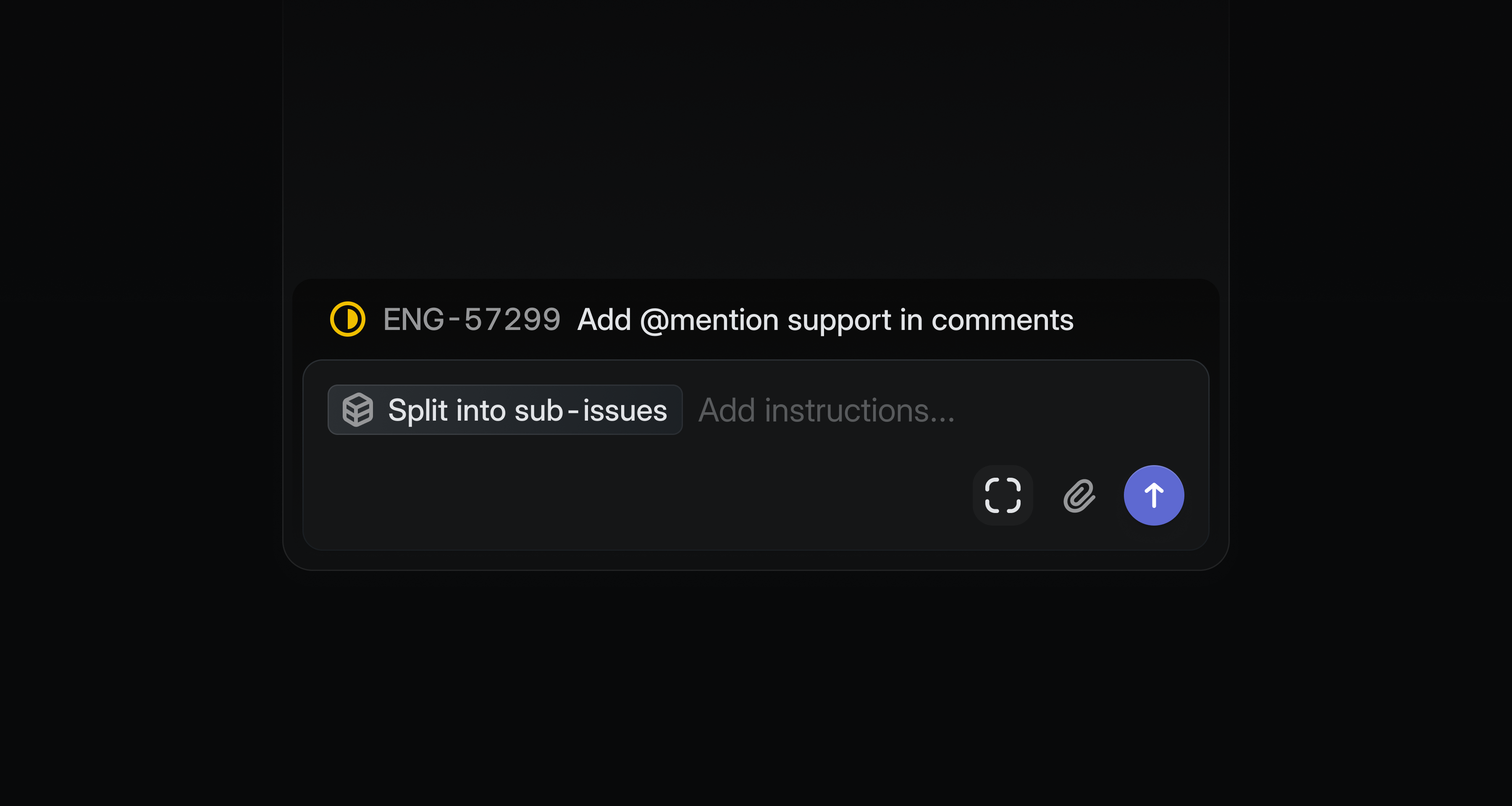
You can also trigger agent workflows automatically when issues enter triage. Every new issue adds context to your workspace, and Linear can intelligently help you refine, synthesize, or act on it.
Automations are available on Business and Enterprise plans.
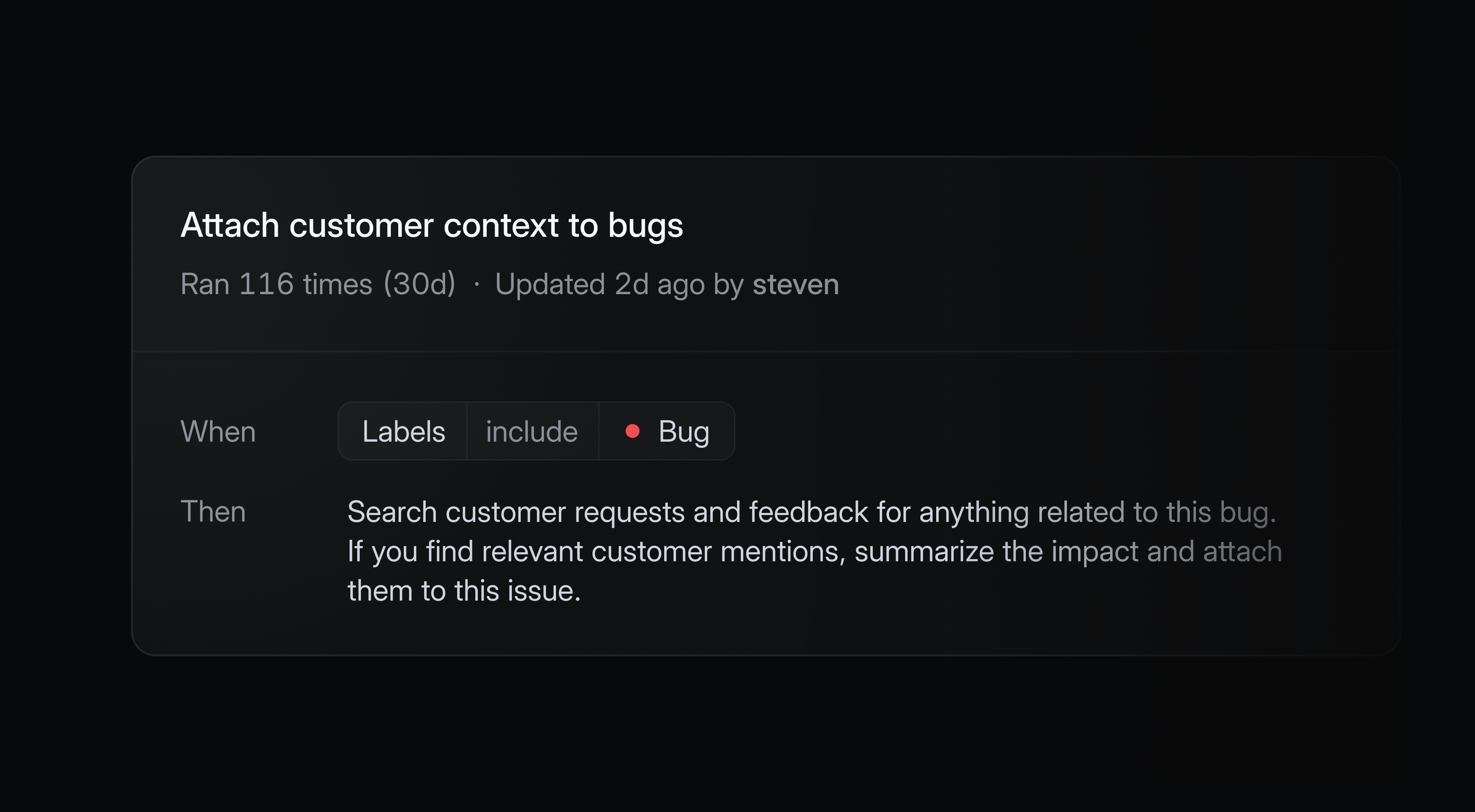
Code Intelligence (coming soon)
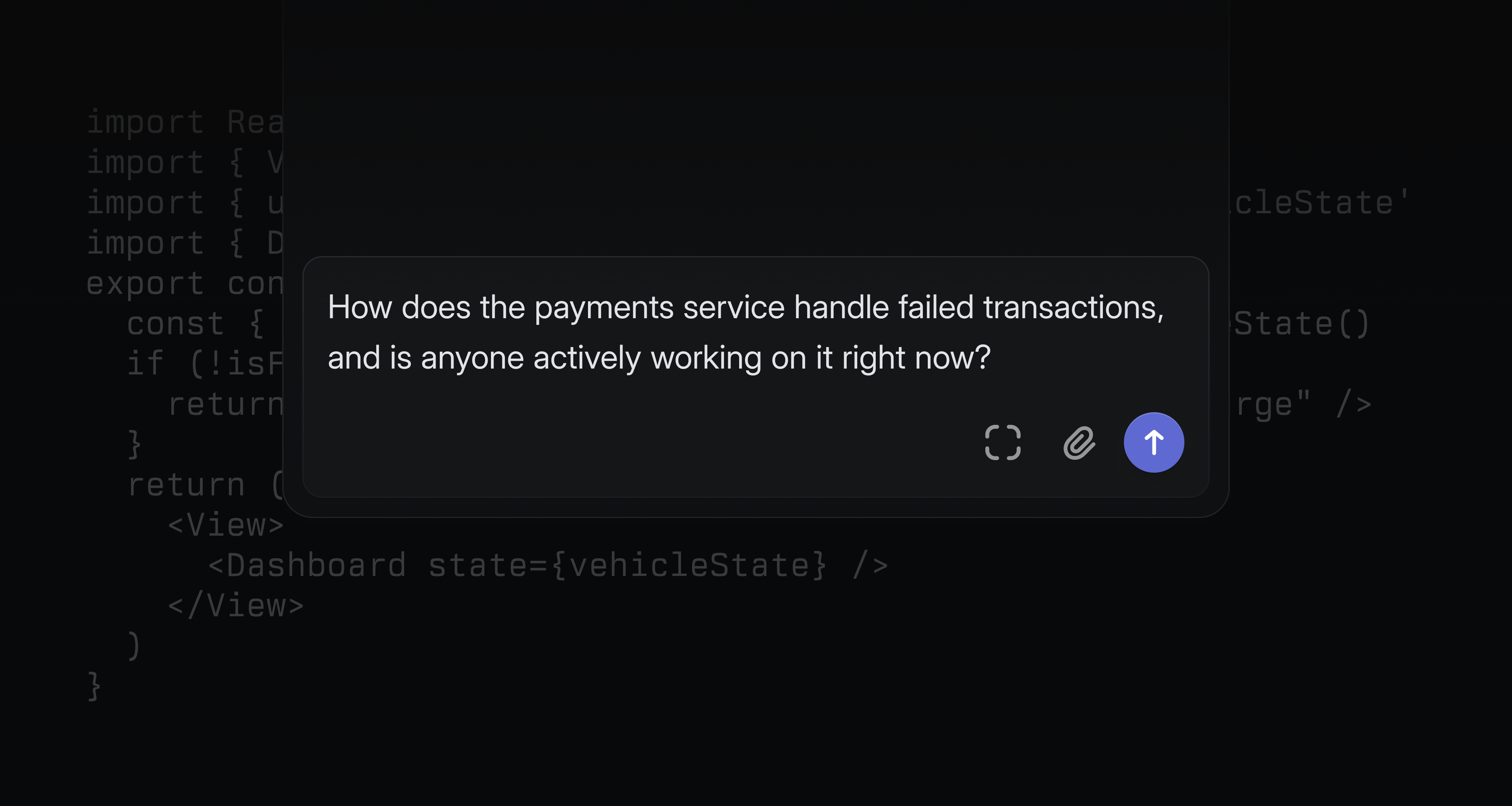
We’re also announcing Code Intelligence, a capability that extends Linear Agent’s understanding to your codebase. Once enabled, it supports code-aware tasks like diagnosing app functionality and designing technical specifications.
Non-technical teammates can ask questions they’d normally have to track down an engineer to answer — how a feature works, who owns a system, what recently changed — and get a reliable response.
Code Intelligence is coming soon to Business and Enterprise plans.
Availability and pricing
Linear Agent is now available in public beta for all teams. Agent and Skills are included on all Linear plans. Automations and Code Intelligence are available on Business and Enterprise.
During the beta period, all features are available at no additional cost as we refine and expand the product.
At general availability, we expect chat functionality — in-app, in comments, Slack, and Microsoft Teams — to remain included in the base seat price. High-volume compute capabilities like Automations and Code Intelligence may move to usage-based pricing beyond a certain threshold.
We’ll provide clear advance notice before any pricing changes take effect. Reach out if you have any questions.
- AsksSlack channel mentions in form submissions now display the channel name with a link (instead of ID)
- DocumentsAdded hover tooltips showing user names in multi-user version history
- EditorAdded a command to change displayed properties (milestones, projects, etc.)
- EditorAdded syntax highlighting for ReScript (.res, .resi) files
- EditorMilestones now appear in the @-mention menu when writing project updates
- EditorImproved text selection when mentions are at the start and end of lines
- OAuthClarified webhook warning to indicate reauthorization is required for existing installations
- ProjectsAdded
Descriptionfield to display options forProjectslist views - SettingsAdded search to the timezone selector in team settings
- Triage RulesAdded support for removing an issue’s assignee
- CyclesFixed right side overflow in cycle detail view
- CyclesFixed cycle tabs only showing the team name instead of the cycle name
- ExportsFixed Google Sheets exports failing when spreadsheets exceed size limits; exports are now disabled with notification and can be re-enabled with a fresh sheet
- GitHubFixed issue attachment links not updating after repository renames
- ImportersFixed projects imported from Shortcut epics being incorrectly archived across shared teams
- InitiativesFixed manual sort order not persisting when reordering sub-initiatives in custom initiative views
- iOSFixed date mentions using incorrect time zone
- iOSFixed initiative reminder notifications opening an unsupported page instead of the update composer
- IssuesRestored the copy branch name button in the post-creation toast
- IssuesFixed blank description and activity feed during initial load
- IssuesFixed project property from templates not applying via template URLs
- MilestonesFixed Slack notifications no longer showing progress percentage for removed milestones
- NotificationsFixed view subscription notifications for due date window filters so issues now trigger when entering a bounded range
- ProjectsFixed project association being removed when creating issues for teams not yet in the project; now prompts to add the team
- SecurityAPI keys now persist across suspend/unsuspend cycles (inactive while suspended)
- SettingsFixed a bug causing the admin modal to appear empty on first open
- TriageFixed a sporadic 404 when moving issues between teams
- GraphQL subscriptions can now be used with the API
- Added filtering to issue created/updated GraphQL subscriptions
- Added the
Team.parentfield in the public API - Added validation of template
descriptionDataagainst the ProseMirror schema to reject invalid node types
- Added support for pagination in the
list_commentstool viacursor,limit, andorderByparameters - Improved initiatives to now return and accept multiple parent initiatives instead of a single parent
- Use G then X to open the team archive
- Cmd/Ctrl J now opens Linear Agent
UI refresh

Introducing a calmer, more consistent interface.
We’ve visually refreshed Linear’s interface design to make it easier to scan information, navigate between workflows, and stay focused.
A few highlights:
- Headers, navigation, and view controls are now consistent across projects, issues, reviews, and documents, making it simpler to orient yourself and move between workflows
- Icons across the app have been redrawn and resized
- Navigation sidebars are slightly dimmer, allowing the main content area to stand out
Learn more about our design process on our blog.
Additional launchers for AI coding tools
We recently gave you the ability to open issues directly in your AI coding tools with all of the context they need to take a first pass.
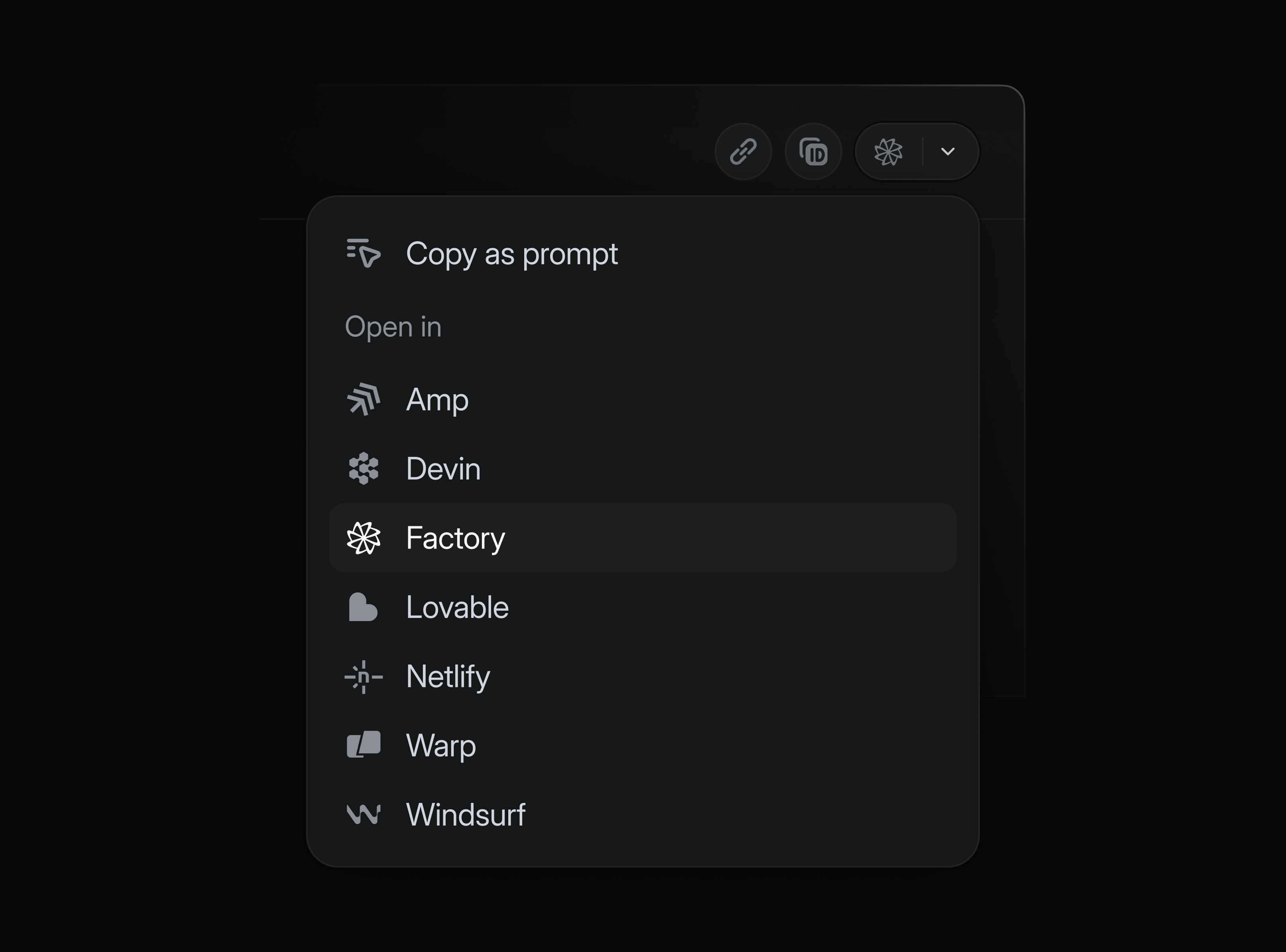
We’ve now expanded the list of supported tools. In addition to popular options like Claude Code, Cursor, and Codex desktop, you can also now open issues in:
- Amp
- Codex CLI
- Devin
- Factory
- Lovable
- Netlify Agent Runners
- Warp
- Windsurf
Enable your tools in preferences, and launch them from any issue using the dedicated shortcut or with ⌘ Opt . (Mac) or Ctrl Alt . (Windows/Linux).
Mobile agent sessions
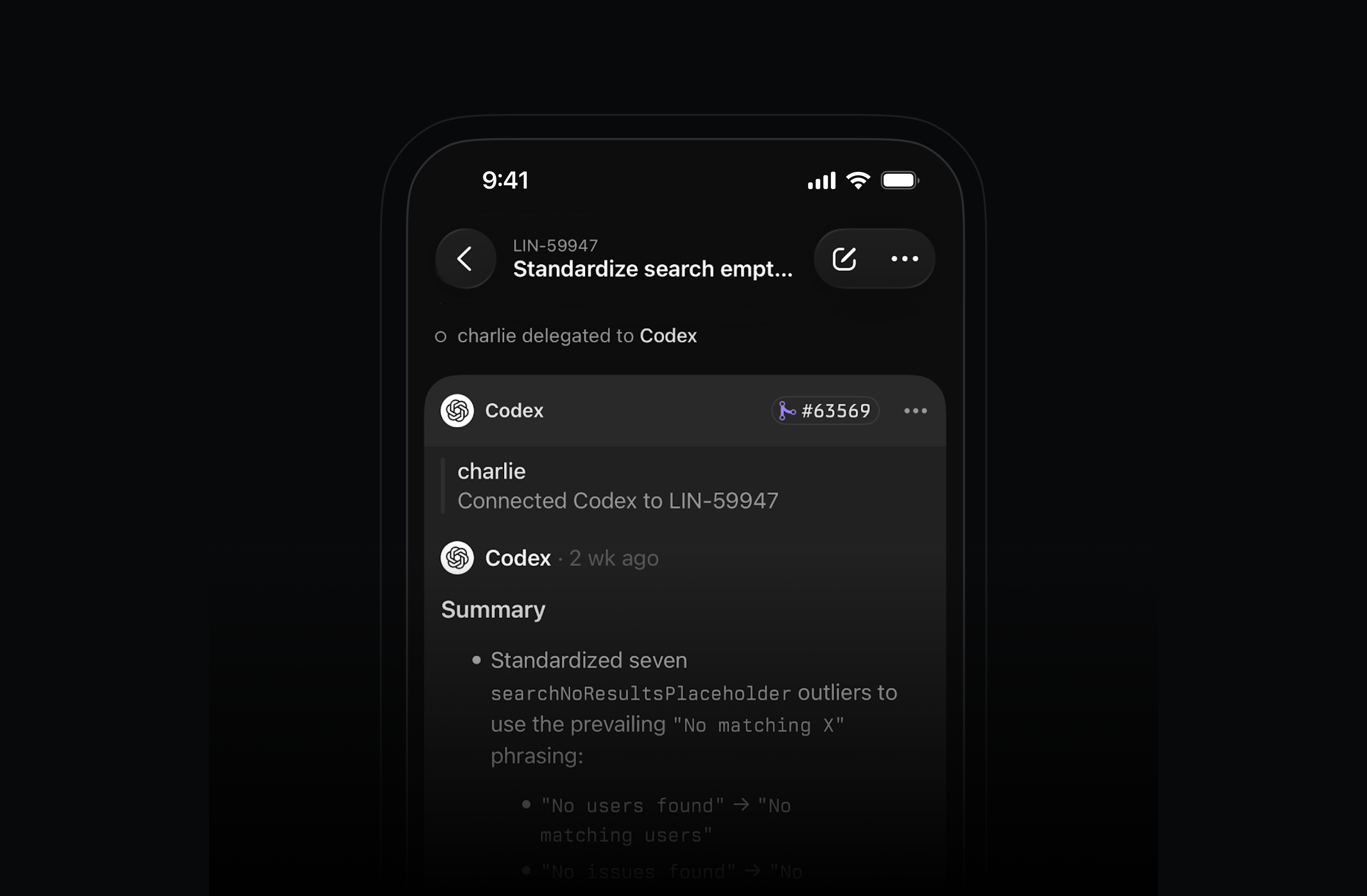
Work with your coding agents on the go. After delegating an issue to an agent, open its session in the Linear mobile app to see realtime reasoning or review past sessions. For agents that support it, you can also send additional messages in the session to help steer the work.
Multiple parents for sub-initiatives
Sometimes a sub-initiative contributes to multiple high-level goals. This is common in goal setting frameworks like OKRs.
Sub-initiatives can now belong to multiple parent initiatives in Linear, allowing you to express how work rolls up in different ways across your org.
Available on Enterprise plans.
Send comment on Enter preference
As part of our design refresh, we’ve made commenting across Linear more lightweight. You can now select between sending comments with just the Enter key or with ⌘/Ctrl Enter in preferences.
- AgentLinear Agent now respects the Slack channel’s synced team context when fetching project updates
- AutomationsImproved automatic issue self-assignment on move to started state for API-driven changes
- DeeplinksAdded support for
issue.branchNamevariable in custom prompt for coding tools - EditorImproved performance when editing text inside a collapsible section
- Email AsksAdded a setting to automatically reopen closed issues when new email replies are received
- Email AsksAdded sender name to the reply-to header for Asks emails
- EmojiImproved emoji search for organizations with a lot of custom emojis
- GitHub SyncAdded alignment (left/right) support for inline images
- GitHub SyncAdded support for inlining images inside headings
- GitHub SyncAdded support for headerless HTML tables in GH sync
- InboxAdded inbox filtering by notification actor, so you can narrow down or clear notifications from a specific agent or user
- InitiativesAdded support for filtering initiatives by created, updated, completed, start date, and latest update date
- SalesforceImproved syncing of comments on issues linked to Salesforce Service Cloud cases as internal notes on the case
- TriageThe modal when marking many issues as duplicates is now scrollable
- AgentsFixed editor toolbar appearing below the agent session panel
- Deeplinks“Work on issue” now uses the default shell where appropriate
- DeeplinksFixed a bug where deeplinks with long prompts could fail on Windows
- DocumentsRelative date mention labels (“Today”, “Yesterday”, “Tomorrow”) are now appropriately updated when the document is open
- DraftsComment drafts are now persisted when leaving inbox view via double-clicking on an inbox item
- EditorAllowed adding an empty paragraph after a code block in the editor using the mouse
- FiltersFixed missing icons for grouped filters in the advanced filter menu
- InsightsFixed an issue where expanding Insights to fullscreen and opening an issue would not re-open Insights in fullscreen when pressing Back
- IssuesFixed default template state being overridden when creating issues from a cycle view
- IssuesFixed a bug where Linear could be shown the actor when the change was made by a user
- ListsFixed an issue where clicking a parent’s checkbox when a child was already selected would not correctly select the parent
- NotificationsFixed view subscription notifications not triggering for time in current status filters
- ProjectsFixed burnup chart being skewed after moving a project to backlog and back
- SettingsFixed saving workflow status sometimes getting stuck in pending state
- SettingsFixed the “Back to app” button in settings navigation not working reliably
- SidebarFixed bug where collapsed sidebar would sometimes not open on hover
- TemplatesFixed the “Create from template” action not listing all templates when used right after opening the app
- TemplatesFixed intermittent issues with saving when editing project templates
- TemplatesConfigured email addresses for templates are again reliably accessible in template settings
- TooltipsFixed a glitch in interactive tooltips which prevented expanding them in some scenarios
- UIImproved handling of discarding from the
Make a copy as new issuedialog - UpdatesFixed project/initiative update editor remaining open when switching tabs
- UpdatesFixed a bug where project updates could get posted to Slack twice
- ViewsFixed project board view groups expanding unexpectedly when saving display preferences
- Fixed numeric shortcuts on non-US keyboard layouts so Cmd/Ctrl+<number> now triggers properly
- Standardized keyboard shortcuts for document headings and body text to match common editor conventions (macOS: Cmd Option 0–4; Windows/Linux: Ctrl Alt 0–4)
- You can now choose whether to send comments on Enter or Cmd/Ctrl Enter in preferences
- IssuesIssues created through the API without a stateId now default to the team default state, even when triage is enabled, if the user is a member of the team
- MarkdownPreviously uploaded file links used in mutations will now correctly render in the editor instead of as plain links
Deeplink to AI coding tools
Starting an issue used to mean manually creating a feature branch. Now it means assembling the right context so your coding agent can take a first pass. We’ve made this much easier to do in Linear.
You can now launch your preferred coding tool directly from a Linear issue, with a prefilled prompt that includes the issue ID and all relevant context: description, comments, updates, linked references, and images. No copying or reformatting required.
Open in a coding tool by pressing Cmd Option . (Mac) or Ctrl Alt .(Windows/Linux) to launch your most recently used tool, W then O to choose from your enabled tools, or by clicking the button next to the issue identifier.
Supported tools:
- Claude Code
- Codex
- Conductor
- Cursor
- GitHub Copilot
- OpenCode
- Replit
- v0
- Zed
Prompt templates can also be customized to add standing instructions for how your agent should approach issues. For example, you may always want your agent to give you a detailed plan before writing any code.
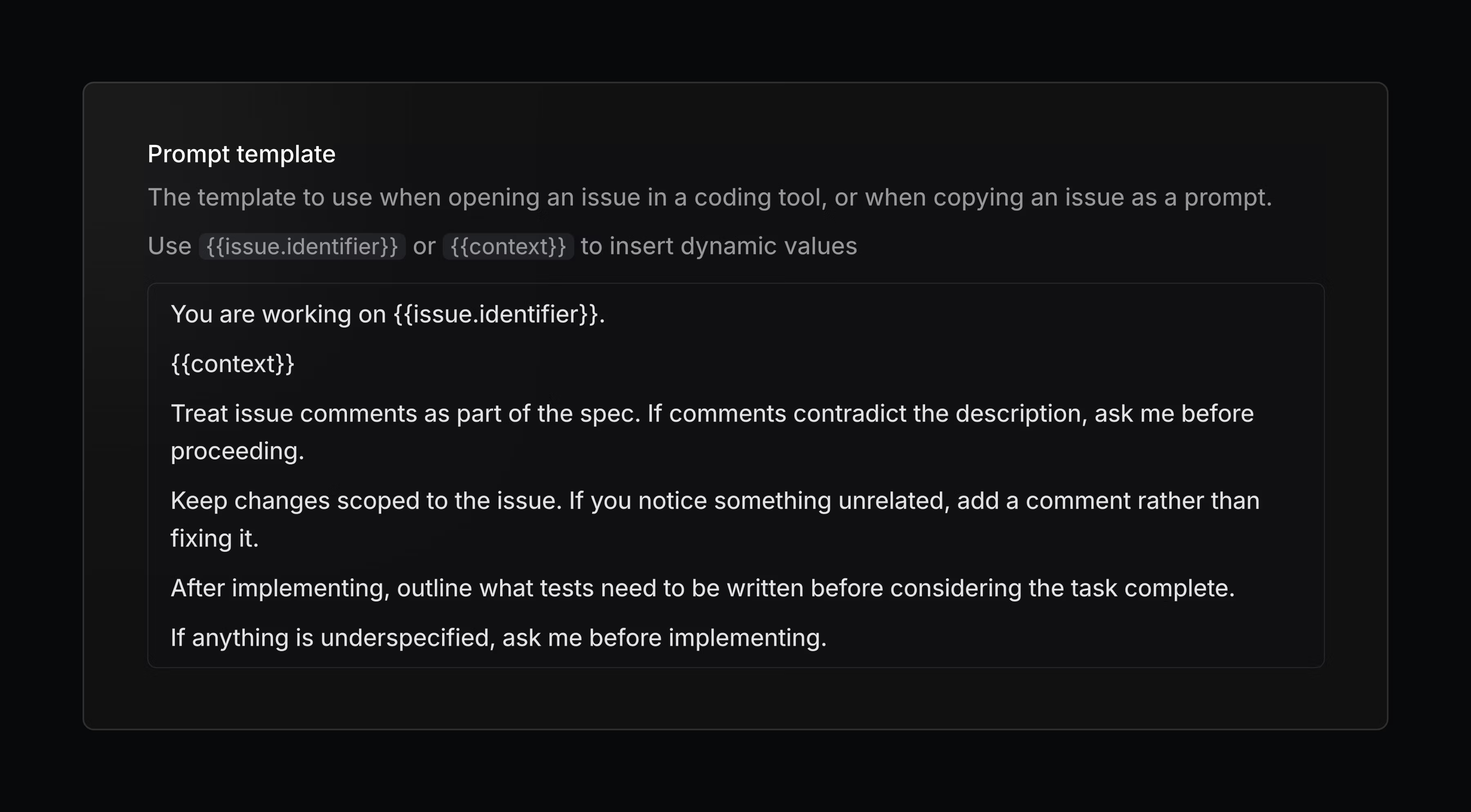
Configure your personal coding tools, prompt template, and more in preferences.
Linear in Notion’s Custom Agents
Create and update Linear issues and projects using Notion’s new Custom Agents. Flexibly and seamlessly connect your workflows across both tools.
- MarkdownPreviously uploaded file links now render correctly in the editor when used in mutations
- WebhooksProject webhooks now trigger on milestone and relation changes
- Agent sessionsFixed agent sessions remaining associated when an issue is archived, allowing them to be restored along with the issue
- DocumentsFixed a bug where switching tabs while commenting on a document would lose the draft of the comment
- EditorFixed an issue preventing editing an empty Mermaid diagram in fullscreen mode
- InsightsFixed an issue where Insights in fullscreen would not reopen after pressing Back when opening an issue
- iOSCorrected SLA history duration rendering in issue activity when SLA start times are reset, including proper “ago” formatting for pre-start breach timestamps
- ListsFixed an issue with selecting a parent when a child issue is already selected
- LocaleFixed a crash that could occur when using an unknown system locale
- Project LabelsFixed an issue adding new labels to existing project label groups in some scenarios
- Project MilestonesFixed drag-and-drop glitches on the project overview page
- Project UpdatesFixed an issue where updates could post to Slack twice
- PulseFixed daily Pulse project/update links incorrectly pointing to
example.com - SettingsFixed editing statuses occasionally getting stuck in a pending state
- ViewsFixed inline search on view lists not reliably returning results.
- ImagesRemoved meaningless image captions (such as hashes or UUIDs) from display
- Issue TemplatesDefault template statuses are now respected in more situations
- WebhooksAdded a
diffMarkdownfield to project and initiative update webhook payloads, providing a formatted summary of changes between updates - EmojisImproved emoji search performance for organizations with many custom emojis
- Agent sessionsThought items in the session sheet now render as full rich text instead of a single truncated line
- IssuesAdded SLA status to issue responses
- IssuesImproved support for parent labels
- IssuesAdded support for filtering issues without an assignee
- IssuesCombined
create_issueandupdate_issuetools into a singlesave_issuetool. - ProjectsAdded support for looking up projects by slug
- The / key now correctly types as a character in action menu text fields when text is present, instead of always triggering search
Advanced filters and share issues in private teams

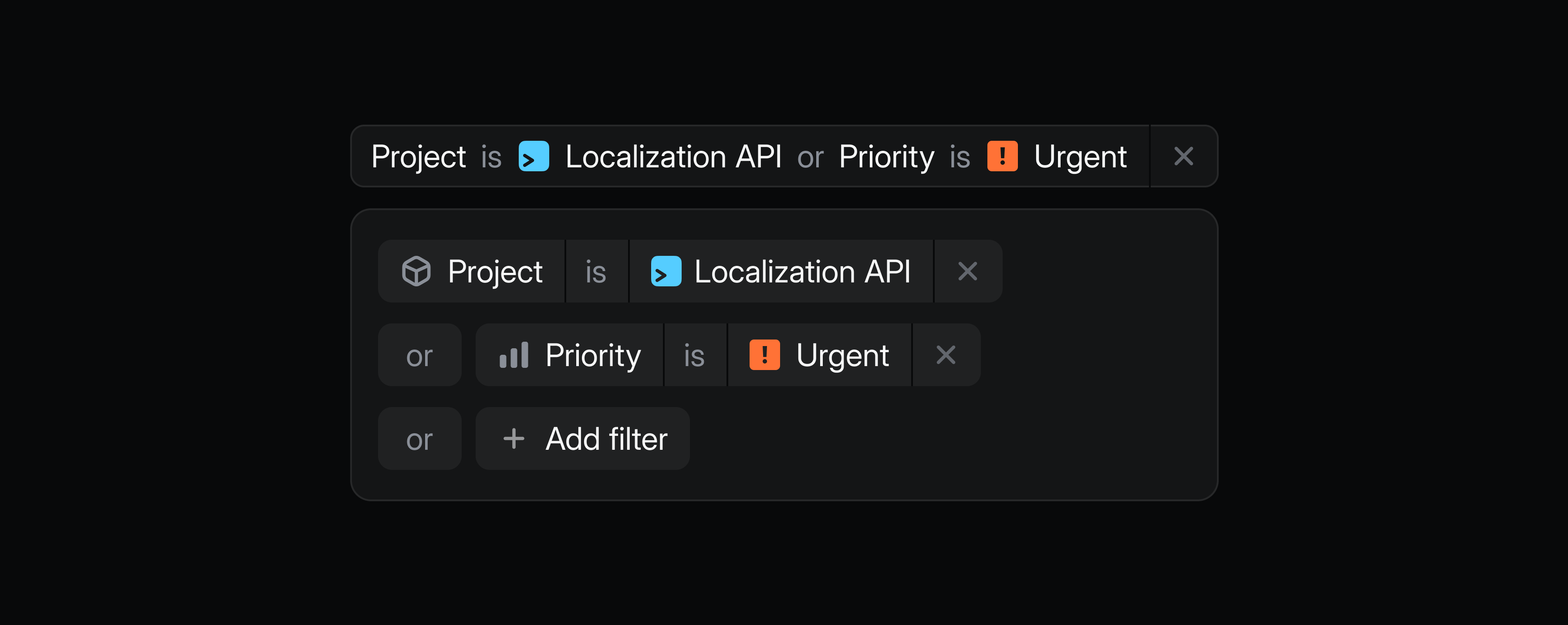
Refine your searches, views, and dashboards with advanced filters. Combine multiple AND/OR conditions to define exactly what you want to see.
For example, track high-priority bugs for prospective customers in a single view by combining Priority, Label, and Customer status filters.
Subscribe to a view to get notified when issues match your conditions, or use advanced filters to power targeted dashboards.
Get started by choosing advanced filter from the filter menu, or use AI filter to describe what you’re looking for in natural language.
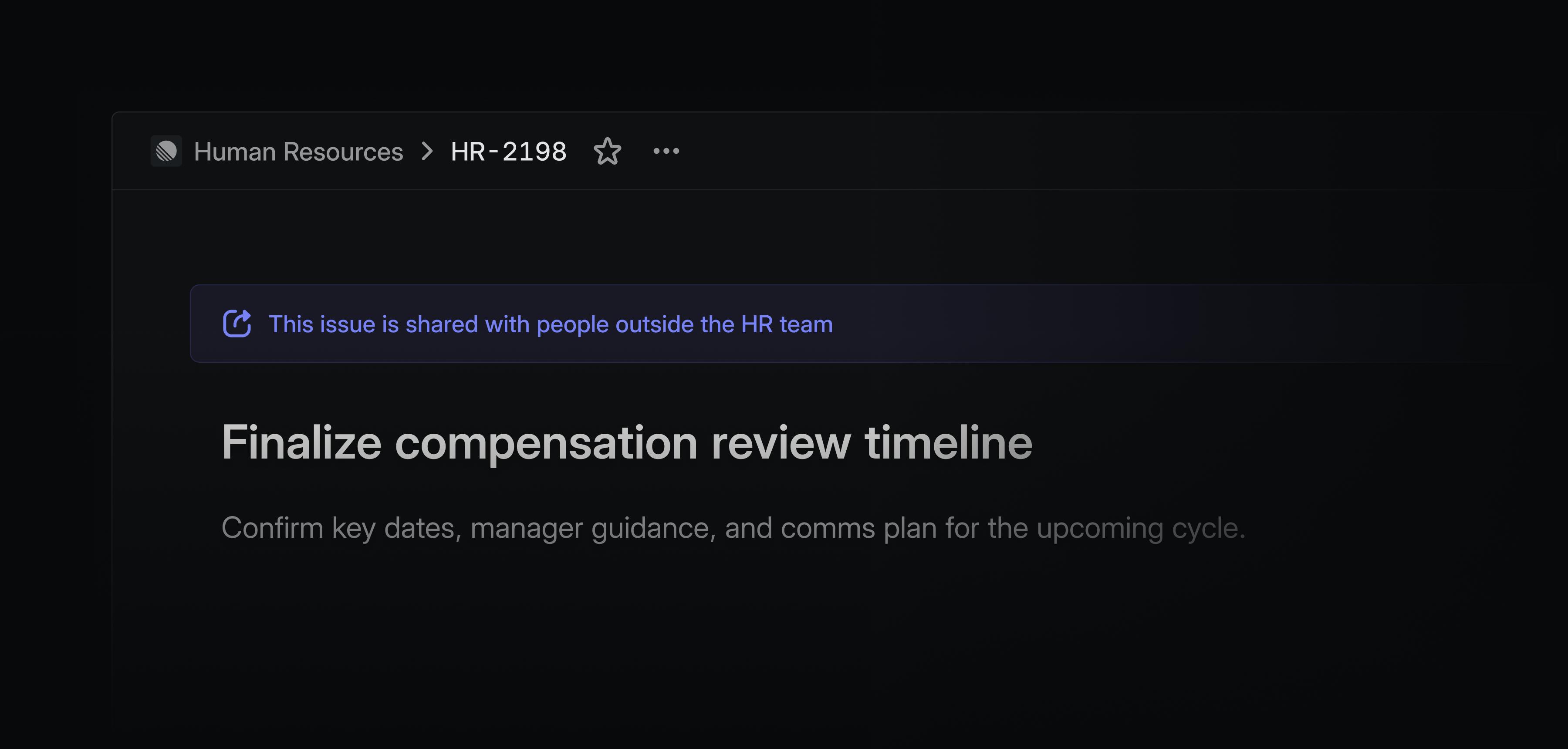
You can now share individual issues from private teams with specific users outside of the team. This is especially useful when bringing collaborators on to solve individual problems for highly sensitive teams, like security or HR. You can assign them a specific issue from your team without giving them access to the rest of the team’s data.
Shared issues will have a banner prominently displayed to indicate who that issue is visible to.
Private issue sharing is available on Enterprise plans. Learn more in our docs.
Create projects and initiatives on Android and iOS
Capture ideas on the go by creating new projects and initiatives on Linear’s mobile apps. Write project summaries and properties to express your intent, then build out full descriptions and milestones later.
Gemini Enterprise connector
Gemini Enterprise users can now create issues from Gemini, and access data from their existing issues and projects. Learn more in our docs.
- AgentLinear Agent for Slack can now add images from a conversation to existing entities
- AndroidAdded ability to copy, edit, and remove issue link attachments via long-press menu
- DesktopAdded option to show notification count in app dock
- ImportersImproved handling of importing closed or done issues; we will now no longer import issues as archived if active parent/sub-issues exist
- InsightsTables on insights using a slice related to a date (like slice by “Created at”) will be sorted from the most recent date to the oldest date top to bottom
- IOSUsers can now add link attachments to issues directly from the issue screen
- PerformanceImproved performance when using certain browser security extensions
- Triage IntelligenceIssue suggestions popover now shows created/completed timestamps to help identify older issues that may be less relevant
- Customers
CustomerNeed.url, deprecated in December 2024 in favor of theattachmentUrlfield, is now removed - MarkdownVideos from websites like YouTube and Loom will automatically be turned into embeds if added as

- Added project resources to MCP responses
- Added the ability to list project members
- AttachmentsFixed Jira link attachments overriding custom link titles
- Customer RequestsFixed customer requests being hidden after restoring an issue from an archived project
- EditorYou will now be prompted to save or discard unsaved editor changes when closing or refreshing Linear
- EditorCode blocks are now visible when printing
- GitHubFixed GitHub sync not updating the issue body when the description was updated via the API
- GitHubFixed GitHub integration configuration page that was redirecting users to a desktop app
- TriageFixed alignment of spacing in triage inbox with notification inbox
- UpdatesFixed project update drafts that will no longer be lost when opening Linear in another tab
- SlackFixed Slack notifications toggle that could get stuck in an indefinite loading state
Linear MCP for product management
We’ve expanded Linear’s MCP server with support for initiatives, project milestones, and updates. These allow product managers to keep plans up to date and communicate progress from other tools like Cursor and Claude.
Newly added MCP tools:
- Create and edit initiatives
- Create and edit initiative updates
- Create and edit project milestones
- Create and edit project updates
- Manage project labels
- Support for loading images
We also improved performance and reduced token usage through better tool documentation, and added broad support for loading Linear resources through URLs.
Deprecation of /sse MCP endpoint
SSE as a transport was deprecated starting with protocol version 2024-11-05. As all modern clients now support the more reliable HTTP streams, Linear MCP is fully removing SSE support. To switch, update your endpoint from https://mcp.linear.app/sse to https://mcp.linear.app/mcp.
Deprecation errors for SSE will be rolled out gradually over the next two months.
Read more in Linear MCP documentation.
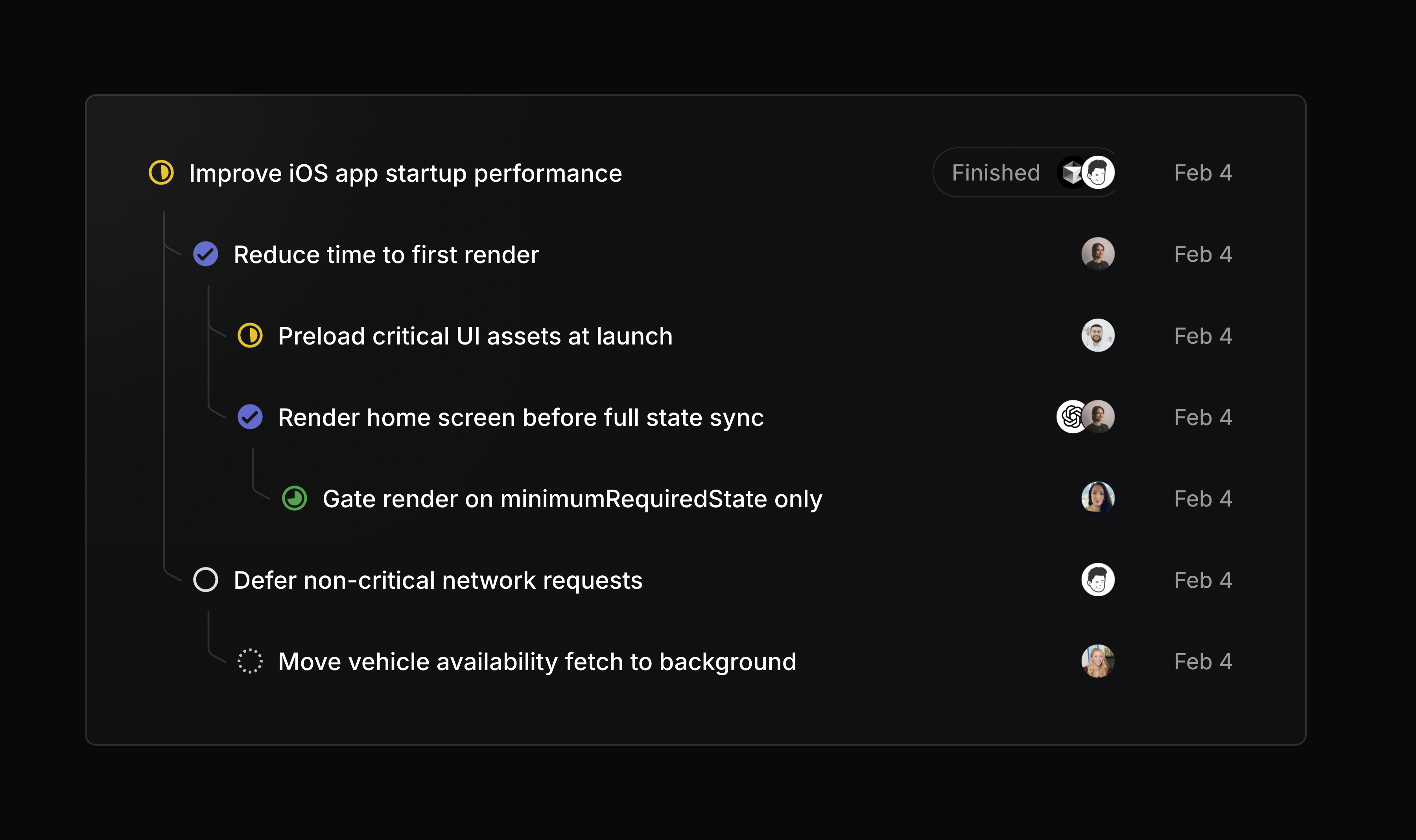
Nested sub-issues
Issue lists can now show sub-issues as a nested hierarchy. Turn on this display option from any issue list view.
Retired teams
Teams form and disband as organizations evolve. When a team is no longer active, its issues and projects still hold useful context, but shouldn’t clutter your workspace.
We’re introducing the ability to retire teams, giving you a clean way to wind a team down while preserving its project and issue history.
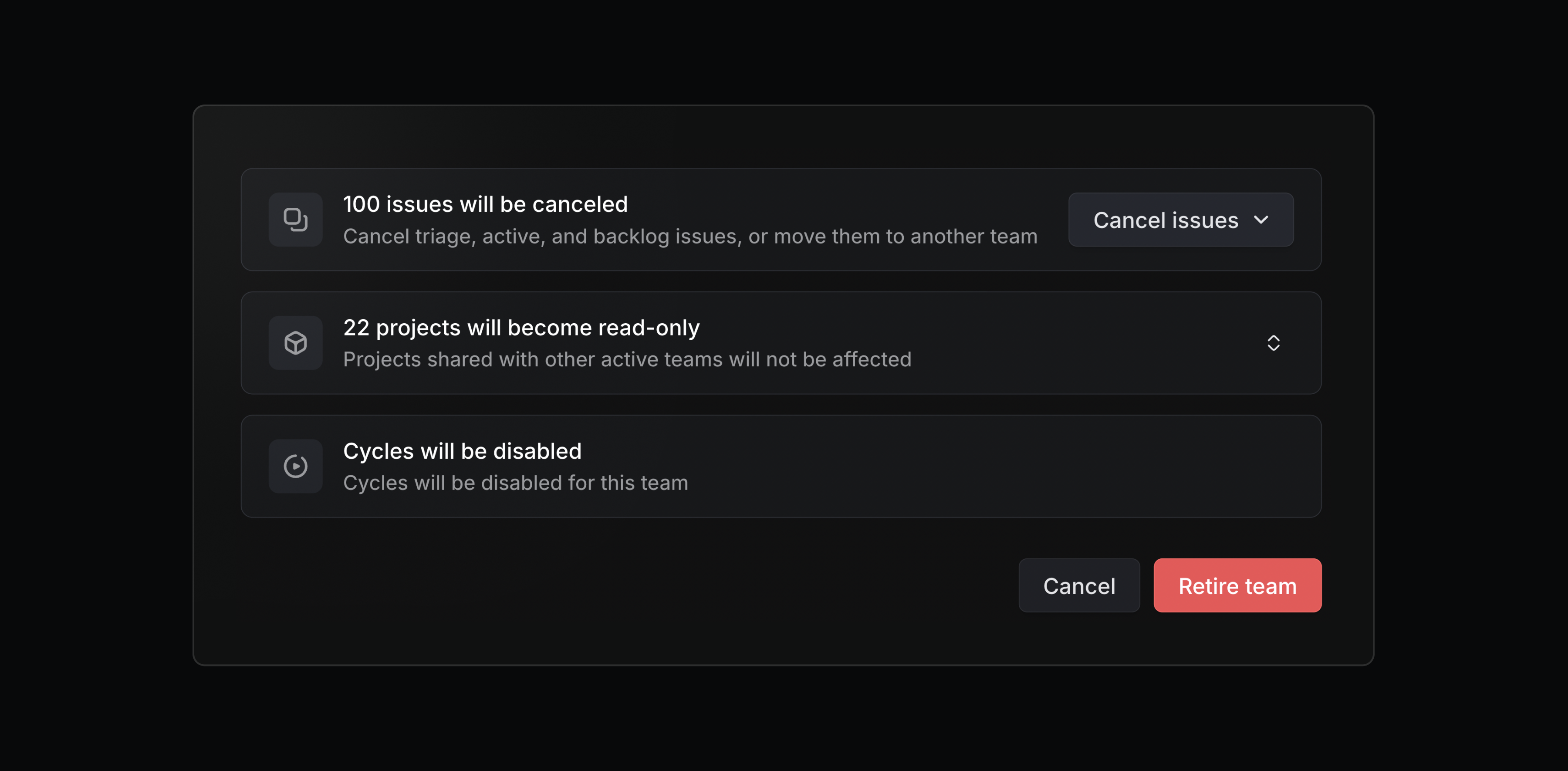
Retired teams are read-only and hidden from the sidebar, but their issues, projects, and documents are still accessible. When retiring a team, you can choose to cancel any remaining open issues or move them to another team. Retired teams can be restored at any time.
Admins, workspace owners, and team owners can retire a team from its settings page.
- AsksAdded a link to Asks settings in the Slack message shown when a channel isn’t configured for auto-creating Asks
- AsksAsks now attempt to include file attachments from forwarded Slack messages when creating issues
- Audit logAdded an audit log entries when a project or issue is deleted
- EmailEmail intake now handles emails with empty or missing subjects by generating AI-powered titles
- Figma PluginImproved the Figma plugin’s performance by no longer loading all pages in the current file
- IOSAdded the ability to create initiatives from the iOS app
- IOSAdded support for composing project and initiative updates directly from Pulse
- NotificationsAdded notifications to inform assignees when an issue is deleted or restored
- SecurityIn Enterprise workspaces, bypass of login method restrictions is now only available to owners, not admins and owners
- SlackImproved how public Slack channel names appear in synced comments. Private channels continue to show only the channel ID for privacy
- Action MenuFixed the command menu becoming unresponsive while typing with CJK IMEs
- DashboardsFixed Insights showing an empty state instead of
0when there were no matches - EditorFixed the table column resize cursor getting stuck after using the resize handle
- EditorFixed embed menu text corruption when pasting URLs with leading newlines
- InboxFixed disappearing avatars in inbox notifications when resizing the browser window
- Issue composerThe issue and project composers now default to your first active team that’s included in the current cross-team view
- Issue TemplatesFixed a bug where sub-issues were duplicated when creating issues from form templates
- ListsYour last scroll position is now properly restored when returning to a list using the back button or keyboard shortcut after clicking into one of its items
- NavigationFixed the Exploring section not appearing in the sidebar when navigating to a favorited page
- OAuthFixed integrations using client credentials being unable to access initiatives
- SearchPreserved search input when switching between result type tabs
- SlackFixed URLs with link text formatting not showing up as expected on Android devices
- StatusesFixed time in status property showing negative seconds on recently changed issues
- AgentsOAuth app agents no longer automatically become the delegated agent when updating an issue’s status to Started or Done
- Added IssueHistory resolvers for project milestones, SLA changes, and triage responsibility teams
- Added keyboard shortcut to add comments in code blocks: Cmd/Ctrl/
Time in status
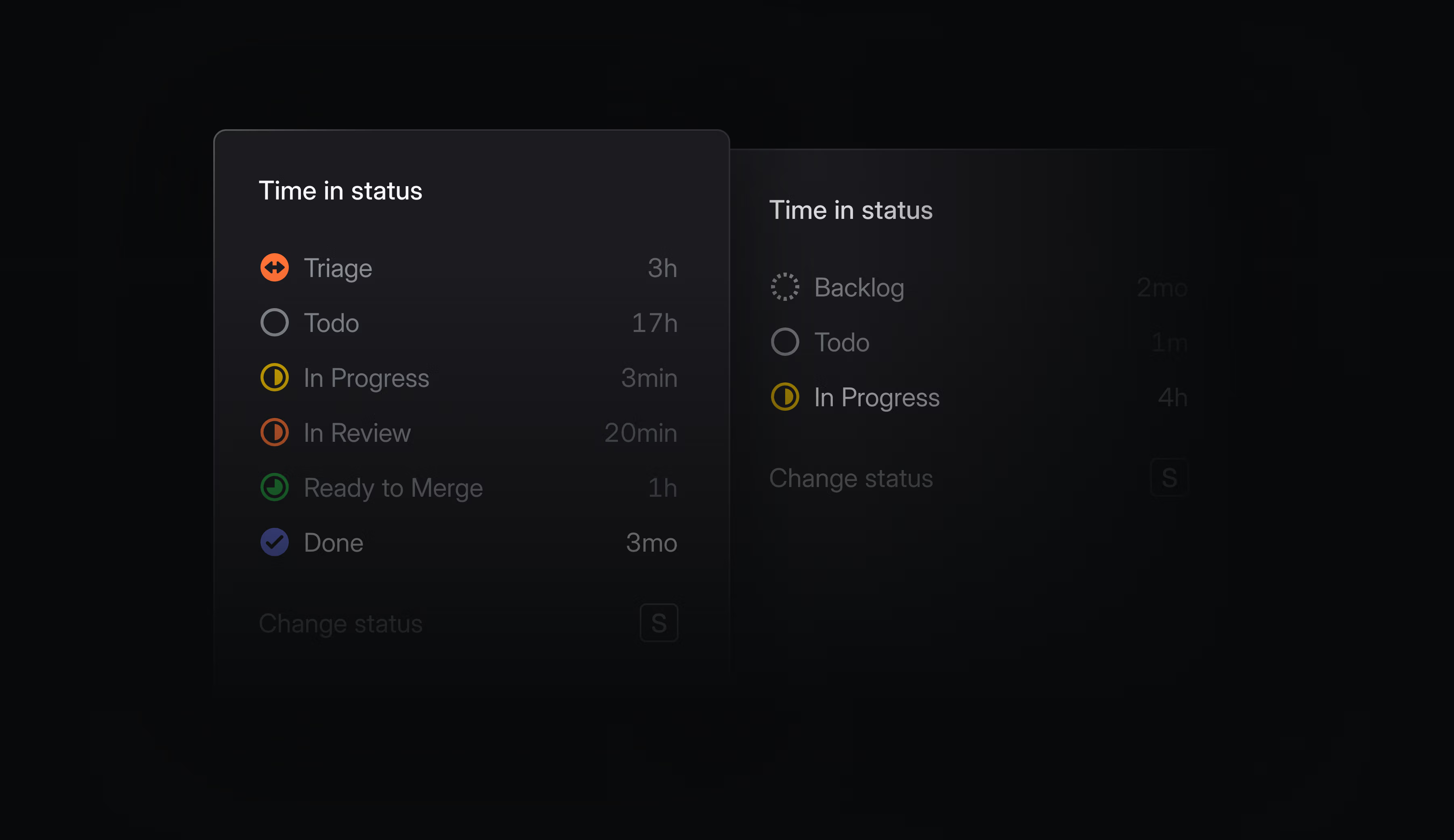
Time spent in individual statuses is now tracked and available throughout Linear. Hover over any issue’s status indicator to see the cumulative time it’s spent in each status. You can use this to spot where things are getting stuck, identify bottlenecks, and optimize your development process.
On lists and boards, you can see how long items have been in their current status. Order by time in status to surface blocked work, or filter by conditions like In Review > 7 days to catch issues that have fallen through the cracks.
In Insights and Dashboards, analyze the time spent in any status and slice by time period or other attributes to see how performance changes and differs across your workspace. Use this to quickly uncover systemic bottlenecks and outliers.
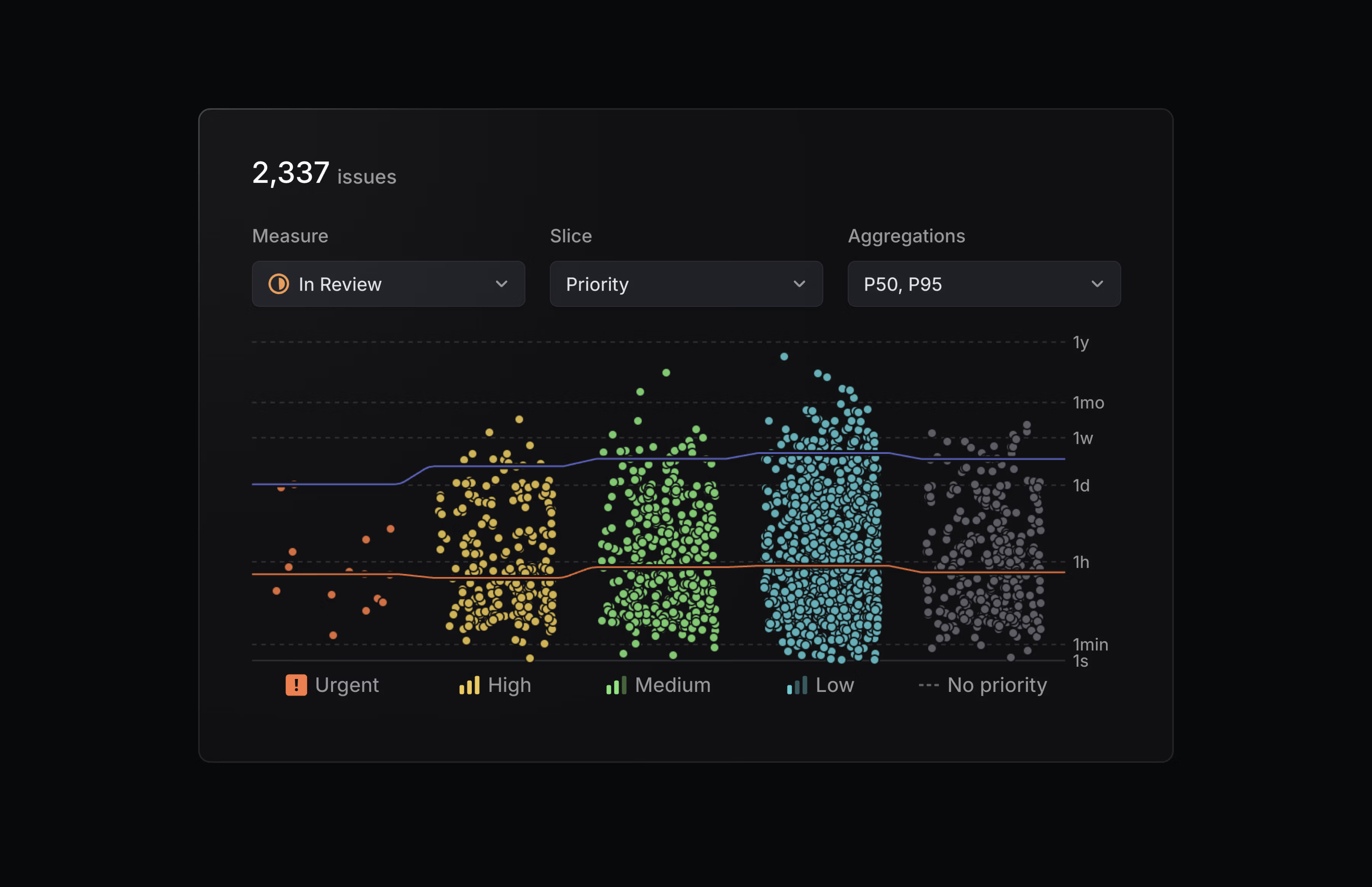
Time in status is available as a display option in views, and as a new measure in Insights.
Jira Epic sync
We’ve upgraded our Jira integration to support bi-directional syncing between Jira Epics and Linear projects. Changes to properties like status, target date, and description automatically reflect in both applications, so you don’t have to update them manually.
Configure the Jira integration from your Linear workspace’s integration settings.
- BoardsFixed horizontal scroll position not being restored on the board view when using rows grouping
- CommentsFixed showing both when a comment was created and edited
- EditorFixed slash command sub-menus to be selectable using the mouse (instead of just the enter key)
- EditorFixed drag-to-reorder todo items not working in Firefox
- FiltersFixed incident.io link filters failing to match issues
- IntegrationsFixed connecting Slack channels from the desktop app
- IssuesFixed issue properties overflowing at certain screen widths
- ProjectsFixed a bug where milestone content or other data could be lost during project creation if the server returned an error
- SettingsFixed label search not updating correctly when switching between workspace and team label pages
- SettingsFixed team member lists not refreshing after members were added or removed
- AndroidAdded support for creating a project and editing project title and summary
- AndroidAdded the ability to filter inbox notifications by category
- ImportersIssue numbers are now preserved from the source tool during imports when the destination team is empty, even if the team was created outside the import flow
- IntegrationsImproved error notifications when Linear can’t connect to a self-managed GitLab instance
- iOSAdded support for creating a project and editing project title and summary
- iOSYou can now toggle todo checkboxes in issue descriptions without entering the editor
- IssuesImproved assignee search by ranking Project and Team members higher than others
- LightboxImproved zoom controls for the image lightbox
- In
update_issue, allowedassigneeanddelegateto be set tonullto remove them. - In
update_project, allowedleadto be set tonullto remove it
Customize your navigation in Linear Mobile

Now you can customize Linear Mobile to fit your daily workflow.
Personalize the bottom toolbar to prioritize the features you use the most. Rearrange the main navigation items, or pin specific projects, initiatives, and documents for quick access. For example, you can choose Pulse to stay up to date with work across your teams, or My issues to manage your assigned tasks.
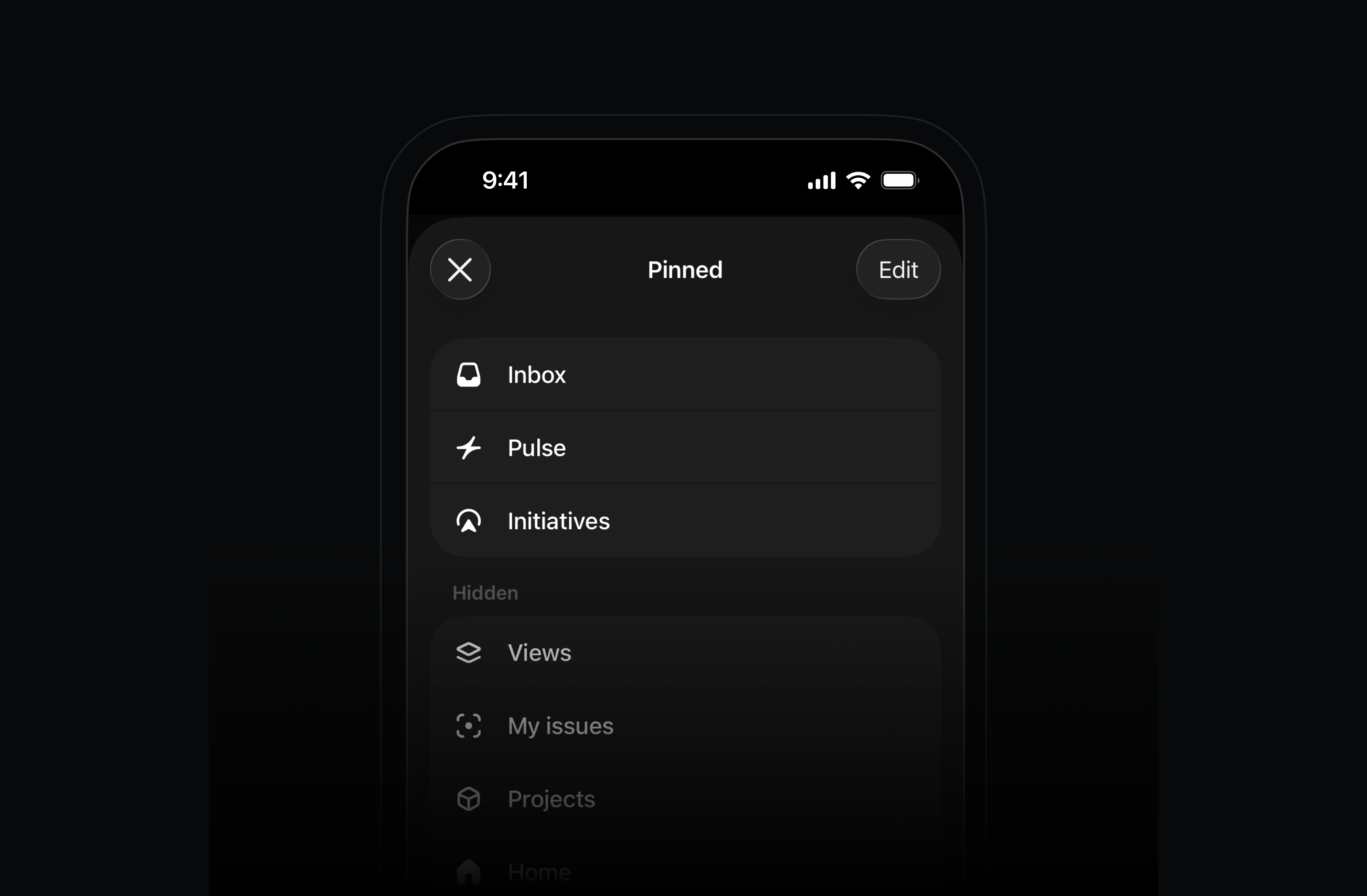
To pin specific projects, initiatives, or documents, open the item and use the ••• menu in the top-right.
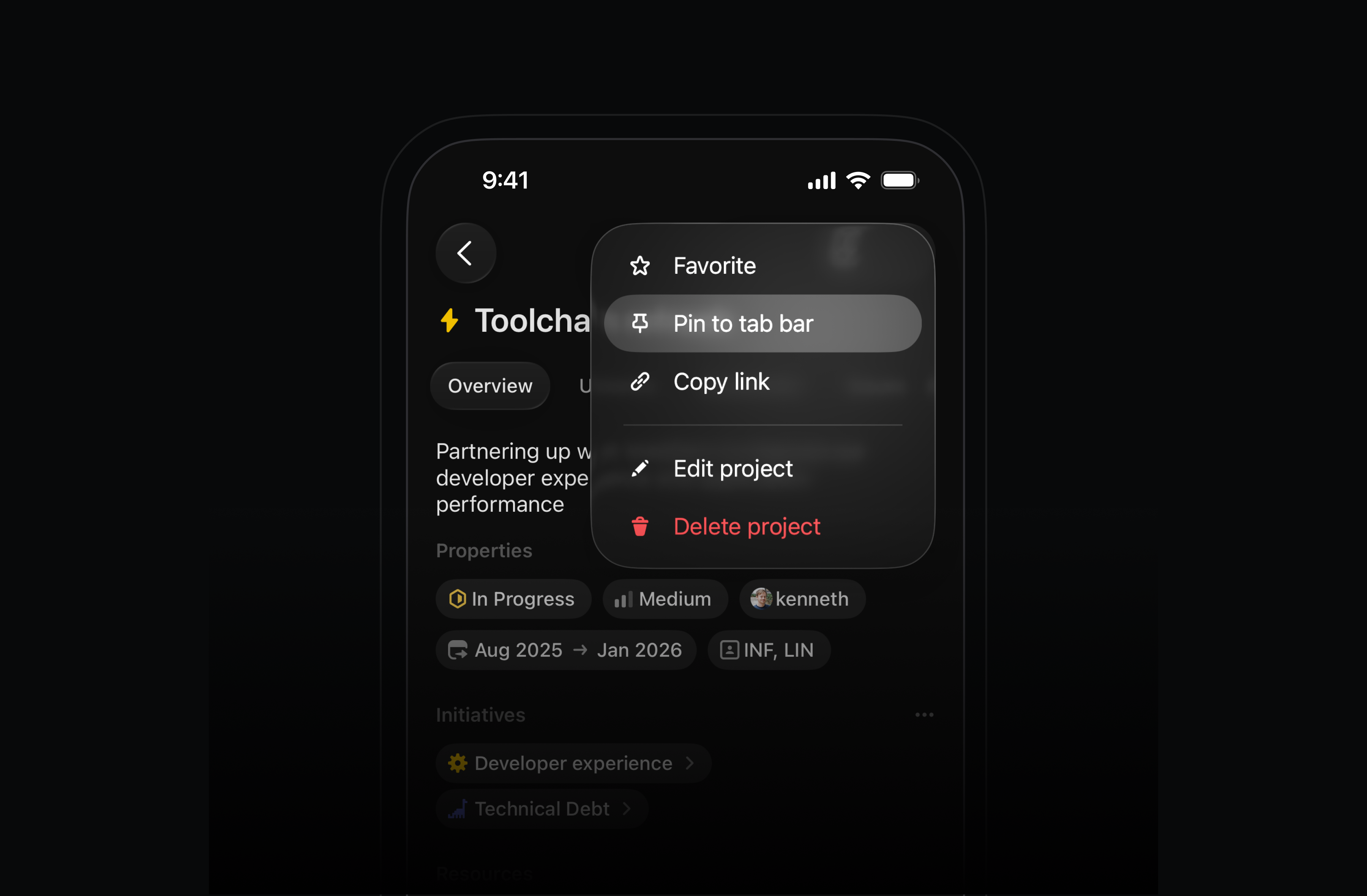
Available today in the App Store and Play Store.
Redesigned timing charts in Insights and Dashboards
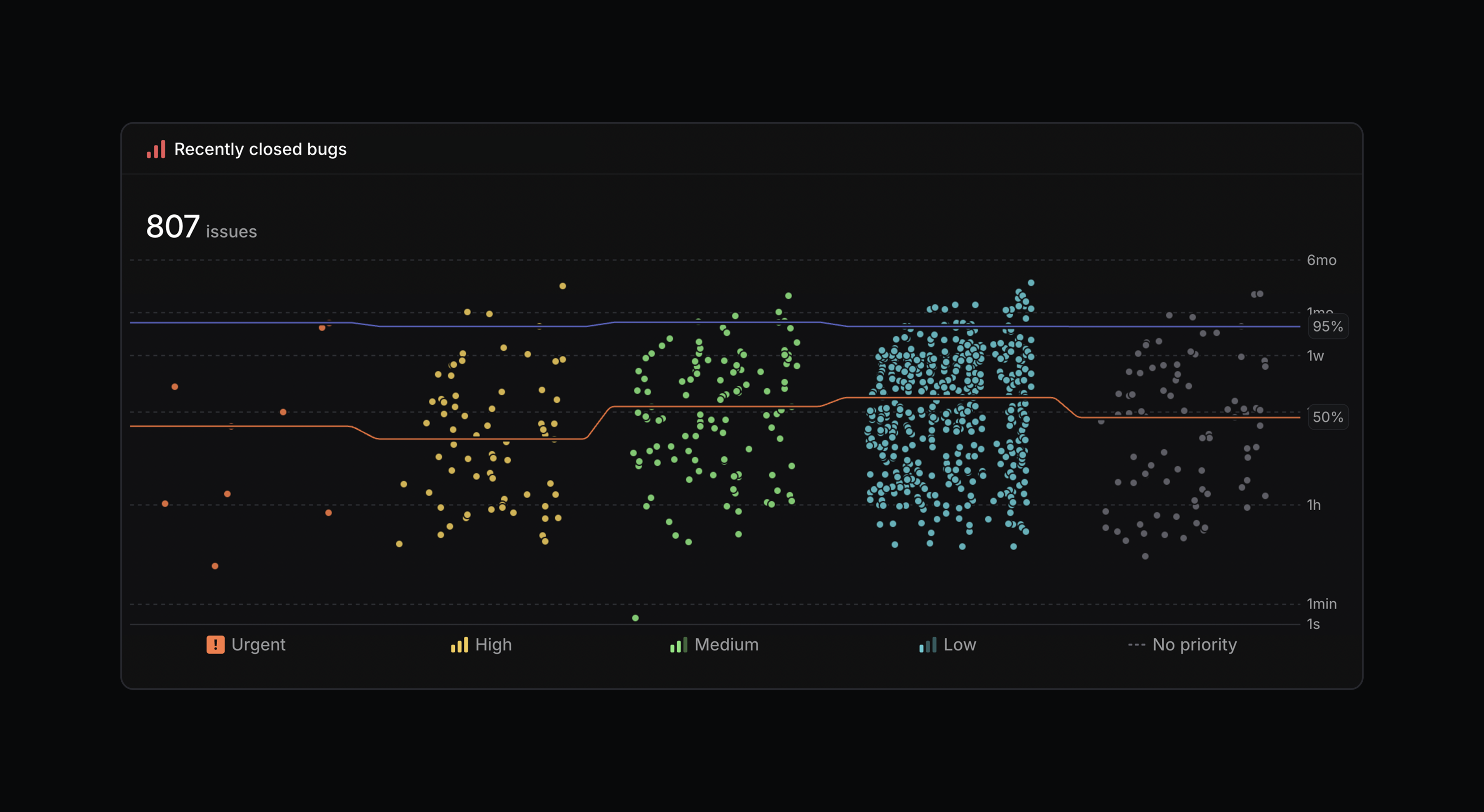
Timing charts in Insights and Dashboards have been redesigned to make it easier to spot workflow trends and bottlenecks.
Timing charts now use a logarithmic scale by default so outliers don’t visually flatten the rest of your data. Percentile metrics also display by slice, allowing you to compare across different dimensions or track changes over time. We’ve also removed issue limits to support analysis across much larger datasets.
Linear Agent for Slack on all plans
We’ve made Linear Agent for Slack available on every plan, including Basic and Free. Update your Slack integration, then create issues or ask questions by mentioning @Linear in Slack.
Linear Code Reviews (Private Beta)
Linear Code Reviews is now available in private beta. We’ve brought code reviews directly into Linear, with support for both traditional PR workflows and agents output.
Join the waitlist to request early access.
- AgentsFixed Linear agent assigning work to inactive users
- AgentsFixed layout shift when loading issue views that have agent sessions
- AgentsFixed agent panel content overflowing when agent output contained long inline code strings
- AsksFixed an issue where email auto-replies were incorrectly inheriting the styles of the emails they were replying to
- BoardsFixed a blank frame appearing on initial render for boards with swimlanes
- BoardsFixed unwanted scrolling when interacting with cards in board views
- CyclesFixed a bug where the tooltips on the cycle progress graph showed the incorrect estimate points for today and tomorrow
- DocumentsFixed moving documents from issues
- EditorFixed an issue with using arrow keys in mentions menu
- EditorFixed an issue where videos glitched between playing and paused state
- EditorFixed an issue of deleting an issue when undoing the creation of an issue from a selection. The issue will be restored on redo
- EditorFixed several usability problems related to dragging and dropping table columns and rows
- Email IntakeFixed an issue where emails with multiple identically named file attachments would only display the first image in Linear issues
- FiltersFixed the inline filter not persisting across navigations to issues in view and back
- IconsTeam icon custom colors now have proper contrast adjustments
- InitiativesFixed the position of comments on the initiative overview page
- IssuesFixed resource links to x.com not being correctly labeled “via X”, and the icon not being visible in dark mode
- IssuesFixed board drag-and-drop not working correctly when dragging issues into empty rows while ordering by priority
- JiraFixed a bug where Jira integration would not map statuses correctly if the status contained non-ASCII characters
- ListsFixed a bug in the shift + click selection logic
- ListsFixed a bug where dates in project lists could get truncated
- MenusFixed click target for checkboxes in menus with multiselect
- NotificationsFixed overly long email subjects for pull request comment notifications
- Project UpdatesFixed milestone progress showing stale numbers in draft project and initiative updates
- ProjectsFixed timeline date tooltip appearing in the wrong position after scrolling vertically
- ProjectsFixed an issue where the deleted project name would remain displayed in the breadcrumb after deleting a project
- ProjectsFixed project update milestone progress not reflecting actual progress when teams have estimates disabled
- SearchFixed project search results rendering
- SettingsFixed audit log table overflowing with longer actor emails
- SettingsFixed an animation glitch in workflow and project status settings
- SidebarFixed an issue on macOS where hovering the left edge would repeatedly show and hide the sidebar if the window was against the leftmost screen edge
- SidebarFixed right-clicking to show hidden items now works between Favorites and Teams
- SlackFixed some labels not being applied on form templates submitted through the Slack integration with a label group field
- SlackFixed some URLs in Linear that formerly rendered incorrectly in Slack
- TooltipFixed tooltip staying visible when clicking on updates in projects or initiatives list
- UIFavorite button color is now properly consistent on hover
- Video TranscriptionFixed video transcription in documents and projects
- AgentsImproved
AgentSessionEventwebhooks, makingAgentActivityWebhookPayload‘suserIdfield no longer nullable - Agents
AgentSession.typefield is now deprecated and will be removed in the future - OAuthAdded support for RFC 7009-compliant
tokenandtoken_type_hintparameters for the/oauth/revokeendpoint. The existingaccess_tokenandrefresh_tokenform fields are now deprecated but remain functional for backward compatibility - WebhooksIncluded a
userobject (not justuserId) in theAgentActivityWebhookPayload, part ofAgentSessionEventwebhooks - Added new
issueRepositorySuggestionsquery to get a confidence-ranked list of repos associated with an issue or agent session - Added
urlfield forAgentSessionin GraphQL API - Added
issueIdtodocumentCreateanddocumentUpdateinputs - Added
issueSubGroupingto the values you can get from view preferences
- AgentsAgent thoughts now take up the full available height of the panel when active
- AndroidAdded “Add link” overflow menu action to the issue screen
- AndroidGit branch name can now be copied to clipboard via issue screen top bar overflow menu action
- CyclesAdded support for documents and links in Cycles
- DocsDocumentation pages now return Markdown content when requested with
accept:text/markdownheader - EditorTable rows can now be sorted by column
- InitiativesWhen navigating to a sub-initiative, the parent is now displayed as a breadcrumb
- InitiativesProjects listed on the initiatives page when viewed from the inbox can now be interacted with
- iOSImproved support for displaying sub-team projects when viewing a team’s project list
- iOSAdded ability to copy the branch name from an issue
- Issue creationWhen creating a new issue, it will now always be placed at the top of the list of issues you’re looking at
- LabelsAdded “Copy link” action to issue and project label pages
- MenusAdded support for selecting a range of options from a menu with multiselect via click while holding Shift
- MenusMenus now open under their triggers by default
- ProjectsWhen sorting by last updated in project views, project updates, milestones, and description changes are now considered updates
- RelatedCapped suggested related issues in the issue sidebar
- SettingsAdded “Leave team” to the contextual menu of team sidebar items and within the “Danger zone” of team settings pages
- SettingsWebhook signing secrets can now be rotated from settings
- SettingsApplication edit form now scrolls to fields with errors on submit
- ShortcutsImproved keyboard shortcut hints highlighting whichever key is pressed
- SidebarNotifications in the sidebar now animate in at the same time, reducing flickering
- TeamsTeam owners can now change parent team
- TimelineProject name truncation no longer jumps around when opening a contextual menu in the timeline’s left-hand sidebar
- ViewsThe GU keyboard shortcut now displays a command picker allowing you to choose between workspace-level views and team-specific views
- ZendeskImproved issue intake to support attachments when Zendesk secure downloads are enabled
- Added support for retrieving and managing issue relations (blocking, related, duplicate)
- It is now possible to add and remove projects from initiatives
- Added new tools for
create_documentandupdate_documentin a project
Team owners

We are introducing a new team owner role to give teams more control over their team settings. Alongside this new role, we’re adding team permissions so you can choose who can manage team settings, labels, templates, and membership — either any team member or only team owners. This empowers teams to define their own policies, while ensuring workspace owners and admins retain control over workspace-wide settings.
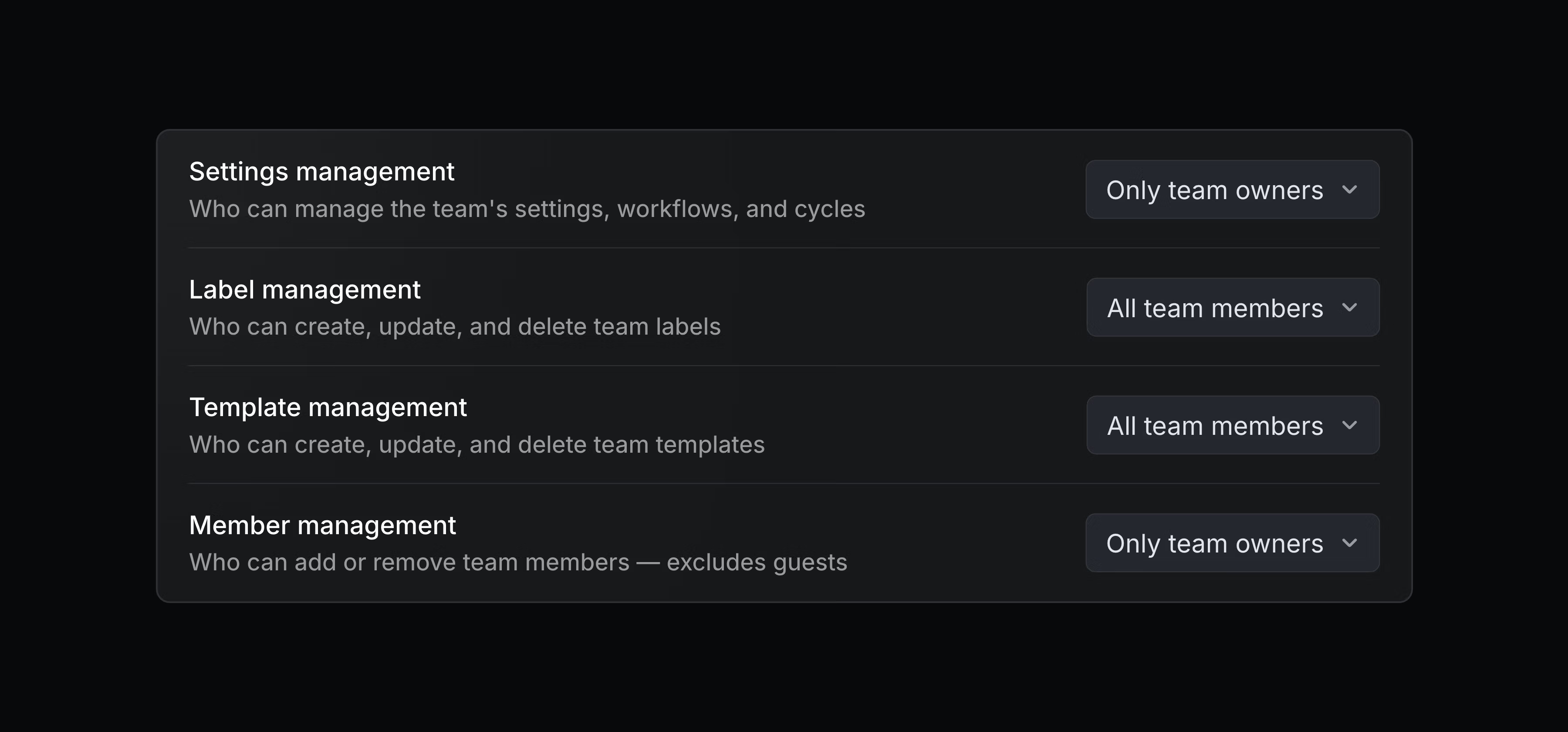
You can also control access and require an invite to join a team. Issues and projects of any team will still remain visible to everyone, and workspace owners and admins can always manage the settings for any team.
Configure these permissions on your team’s Access and permissions page. Team owners and permissions are available on Business and Enterprise plans. Learn more in the docs.
v0 by Vercel MCP connector
Access your Linear data from v0 to generate prototypes, dashboards, and internal tools. After connecting Linear’s MCP server, you can pull context from Linear issues, projects, and discussions when building in v0. Learn more.
- AgentsImproved visual aspects of agent chat interfaces to better surface responses, highlight associated pull requests, and automatically collapse agent thoughts after work completes
- AsksYou can now explicitly link your Slack user ID with Linear when managing Asks settings to ensure you have access to private channels’ settings in Linear
- EditorImproved custom Slack emojis to appear when pasted if they are available in your Linear workspace
- EditorImproved support for pasting images with external links into Linear
- EditorImproved emojis in text pasted from Slack to be replaced with their Linear equivalent, or rendered as :emoji: if not available
- EditorTable cell and block (image, video, etc.) selections will now be visible to other users during collaborative editing
- TemplatesDisabled form templates in the sub-issue composer
- Video playerVideos now generate automatic closed captions which are indexed for search
- ActionsFixed Cmd/Ctrl C failing to copy title as link when the issue title already contains a markdown link
- CustomersFixed domain validation incorrectly rejecting valid public suffix domains when creating a customer
- EditorFixed automatic scrolling of long tables when dragging to rearrange rows
- EditorImproved contrast of unchecked checklist checkbox borders in dark mode
- EditorFixed Shift Cmd + Arrow keys inside of table cells to first select text before selecting the whole cell, and then the remainder of the row or column
- GitHubFixed an issue that let users connect personal GitHub integrations before a workspace-level GitHub integration existed
- GitLabStopped transitioning issues to review when a merged merge request receives comments or metadata updates.
- OAuthFixed
oauthTokenMigrateOldTokento successfully migrate old app tokens to the new short-lived tokens with a refresh token - Project templatesFixed issue disappearing when selecting a team outside the project in project template editor
- SlackFixed personal Slack connections to now be associated with a Slack workspace that is already connected to Linear for a Slack or Asks integration
- ProjectsFixed choosing project dependencies to now prioritize projects you’re a member of
- AgentsAdded
promptContextfield toAgentSessionEvent“created” webhooks, a formatted string containing the relevant context for the agent session, including issue details, comments, and guidance - IssuesFilters on issue IDs now also accept identifiers
- It is now possible to add and remove issues from project milestones
- Labels returned to the model will now include their group information
- Added support for project icon and color in
create_projectandupdate_projecttools - Added optional team filtering to
list_userstool